Authentication
The Contact Center Campaigns API is currently in Beta. See the Overview for details.
Overview
The Contact Center Campaigns API uses two request headers to authenticate and route every request:
X-API-Key— an Admin Console API Key belonging to an app that has the Contact Center Campaigns API Product attachedX-8x8-Tenant— your 8x8 tenant name
Unlike the legacy Contact Center Dynamic Campaigns API, HTTP Basic authentication is not supported.
Admin Console API Key
Admin Console API Keys are managed centrally through the 8x8 Admin Console. Every key belongs to an app, and each app has one or more API Products attached to it — the Product controls which APIs the key can be used against. The Contact Center Campaigns API requires the Contact Center Campaigns API Product.
How to obtain a key
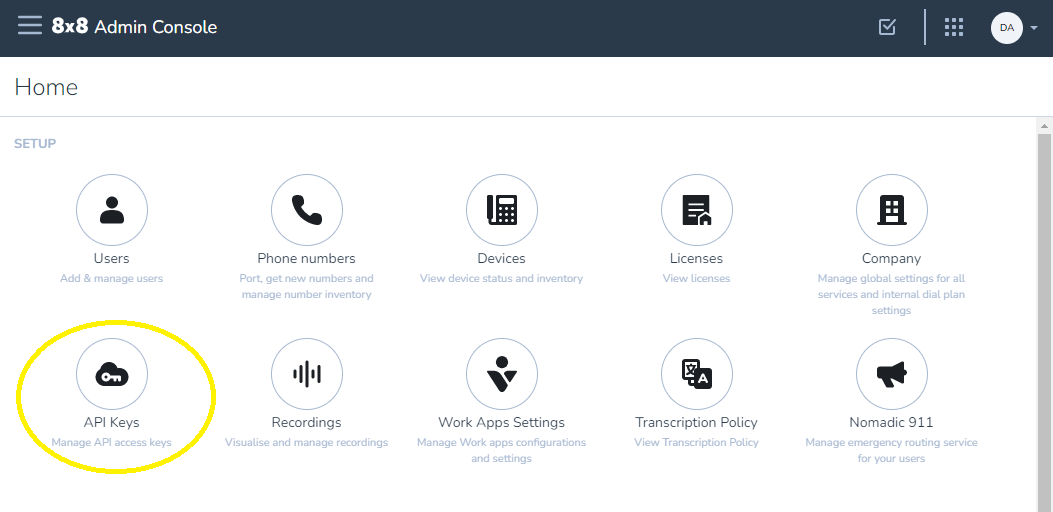
If the API Keys option isn't visible in Admin Console, your account doesn't have the required permission. See the required permission section below.
-
Log into 8x8 Admin Console
-
In the SETUP section, click API Keys
-
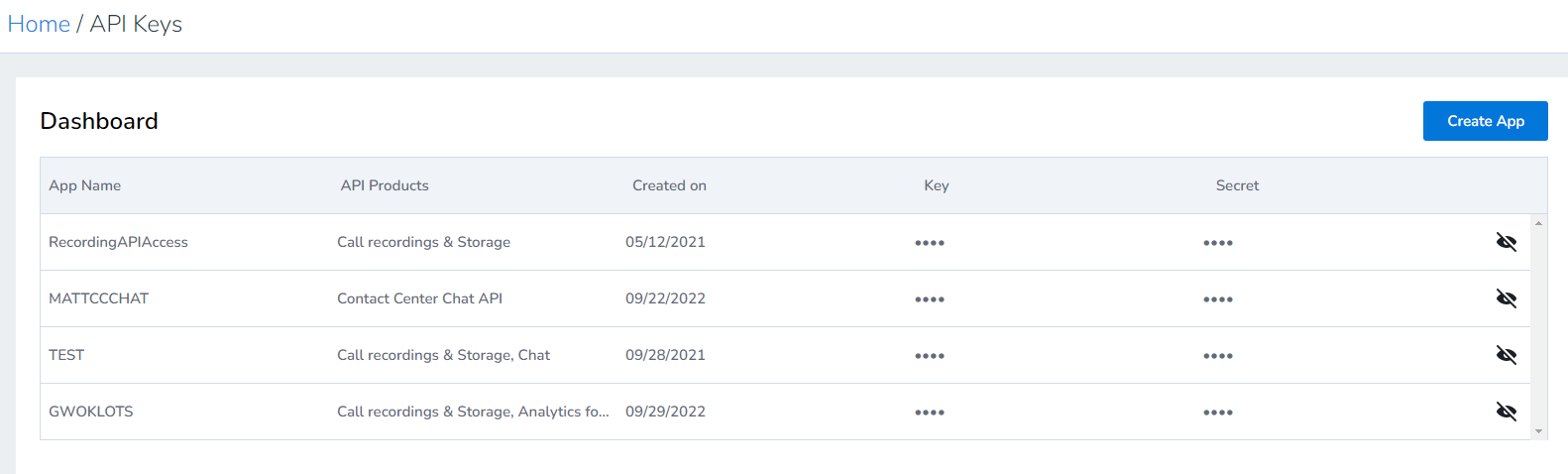
Click Create App (or edit an existing app if you already have one you want to use)
-
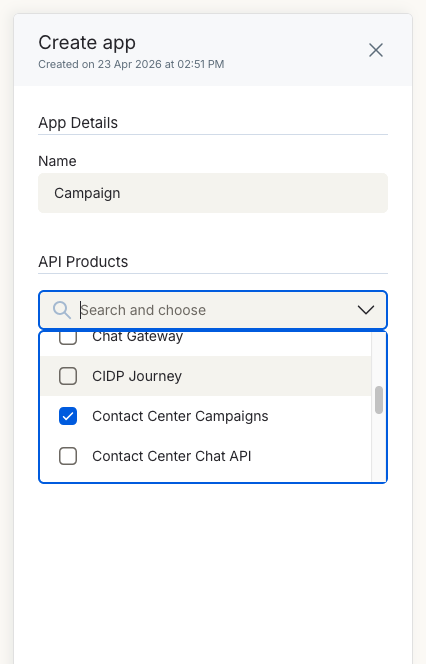
Enter an application name (no spaces allowed)
-
In the API Products dropdown, select Contact Center Campaigns
-
Click Save to generate your key
The dashboard will display your newly created app with the generated API key. The key always starts with
eght_and can be viewed at any time by clicking the eye icon.
Required permission
Creating or managing Admin Console API Keys requires the Application Credentials permission. This is granted by the Company Admin role, or can be granted via a custom role.
For full details on API Key management, see How to get API Keys.
Key format
- Admin Console API Keys always start with
eght_ - The key is passed in the
X-API-KeyHTTP header
Tenant identification
Every request must include an X-8x8-Tenant header identifying your tenant:
X-8x8-Tenant: your-tenant-name
The tenant name is distinct from the {customer-site} value that appears in the URL path. The customer site identifies a region (US1, US2, UK3); the tenant name identifies your specific tenant within that region.
Combined header usage
Every request with a body sends all three headers together:
X-API-Key: eght_your_admin_console_key
X-8x8-Tenant: your-tenant-name
Content-Type: application/vnd.campaigns.v1+json
Troubleshooting authentication
401 Unauthorized
- The
X-API-Keyheader is missing or malformed - The key doesn't start with
eght_ - The key has been revoked or the app has been deleted in Admin Console
403 Forbidden
- The key is valid, but the Contact Center Campaigns API Product is not attached to the app. Edit the app in Admin Console and add the Product.
- The Admin Console role granting the key doesn't permit this API
404 Not Found (on every request)
- The
X-8x8-Tenantheader value doesn't match a known tenant, or is missing - The
{customer-site}segment of the URL is wrong —US1,US2, andUK3are the only valid values
For the full error catalogue, see Troubleshooting.
Next steps
- Endpoints - Request and response reference
- Campaign State Machine - Which actions are valid from which states
- Troubleshooting - Common issues and debugging guide