LINE Official Notification (LON)
LINE Official Notification is a separate product from the LINE Official Account channel, not a message type within it. It has its own endpoint, its own sub-account and bearer token, its own recipient key, its own template approval workflow, and, uniquely among the LINE products on 8x8, a delivery receipt. This page documents the complete request contract, including the full icon set and every content property. For what LON reports back after a send, see LON Delivery Receipts.
How LON Differs from the LINE Official Account Channel
| Feature | LINE Official Notification | LINE Official Account |
|---|---|---|
| Channel type value | LineNotification | line |
| Direction | Outbound only, strictly one-way | Inbound and outbound |
| Recipient keyed by | user.msisdn (phone number) | user.channelUserId (LINE user ID) |
| Endpoint | POST /api/v1/subaccounts/{subAccountId}/lon | POST /api/v1/subaccounts/{subAccountId}/messages |
| Templates | Required, and must be pre-approved by LINE | Not supported |
| Content types | Text and Button, inside an approved template | Text, Image, Video, Audio, Location |
| Character limit | 500 characters per template | 5,000 characters per text message |
| SMS fallback | smsFallback object on the request body | content.sms on the shared request body |
| Delivery statuses reported | Accepted, Sent, Delivered | Accepted, Sent |
| Sub-account and API token | Its own | Its own |
Note
LON identifies the recipient by phone number, while the LINE Official Account channel identifies them by LINE user ID. These are not interchangeable. Whether the LON service resolves a LINE recipient server-side from the phone number, and what happens when no LINE user matches, is not described in any available source. What is documented is the request contract:
/lonacceptsuser.msisdn. One LINE Official Account can serve both products at once, but each product needs its own 8x8 sub-account, precisely because of this difference in addressing. See The LINE Official Account.
Template Approval
LINE Official Notification is strictly one-way, and every template must be approved by LINE before it can be sent.
- You cannot compose freeform LON content at send time. You populate an approved template.
- New templates are submitted through 8x8. Contact cpaas-support@8x8.com to submit a template for LINE approval.
- Plan template approval into your project schedule the same way you plan account verification. It is a dependency on LINE, not on 8x8.
Endpoint
Endpoint:
POST https://chatapps.8x8.com/api/v1/subaccounts/{subAccountId}/lon
Path Parameters:
{subAccountId}: The sub-account provisioned for LINE Official Notification. 3 to 50 characters, restricted to letters, digits, and the characters-,.,_, and&. This is not the same sub-account as your LINE Official Account channel.
Authenticate with Authorization: Bearer {apiKey}, using the API key for the LON sub-account. See Authentication.
The user and content properties are required in the request body.
Adjust the base URL for your platform region. See Base URLs.
Request Body
The example below populates every available component. Remove the components your approved template does not use.
Sample JSON Payload:
{
  "user": {
    "msisdn": "+15551234567"
  },
  "clientMessageId": "<YOUR_MESSAGE_ID>",
  "content": {
    "title": "Event reminder",
    "company": "8x8",
    "icon": "calendarCheck",
    "greeting": "Can't wait to see you there!",
    "emphasis": {
      "label": "Event name",
      "Content": "8x8 Conference"
    },
    "list": [
      { "label": "Date:", "content": "Tue 26/09/2026" },
      { "label": "Time:", "content": "09:00 - 16:00" },
      { "label": "Venue:", "content": "8x8 Office, 17th Fl." },
      { "label": "Seat:", "content": "A-07" }
    ],
    "explanation": "We would like to remind you about your reservation for tomorrow's event. Registration opens at 09:00. See you soon.",
    "actions": [
      { "title": "View agenda", "url": "https://www.example.com/agenda" },
      { "title": "See directions", "url": "https://www.example.com/directions" }
    ]
  },
  "smsFallback": {
    "text": "Event reminder: 8x8 Conference on Tue 26/09/2026",
    "source": "8x8 events",
    "encoding": "AUTO"
  }
}
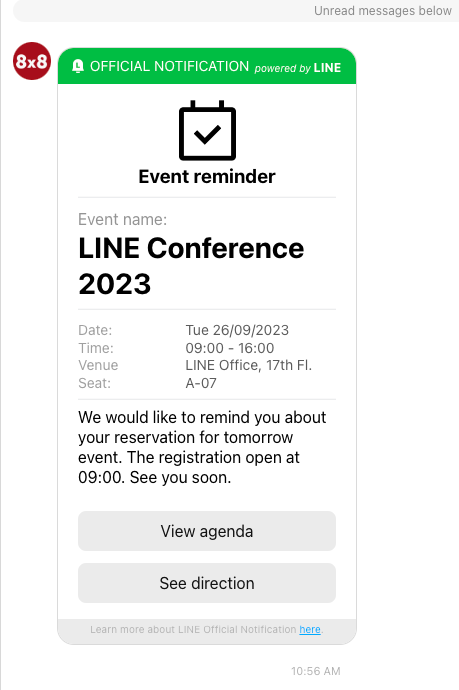
Key Fields:
user.msisdn(required): The recipient's mobile number. International E.164 format with a leading+is preferred. National format is also accepted if you setuser.country.user.country(optional): A two-character default country code, for exampleTH, used whenmsisdnis in national format. Not needed whenmsisdnis in E.164 format.clientMessageId(optional): Your own unique reference for the message, maximum 50 characters. Echoed back in the response and in delivery receipts.dlrCallbackUrl(optional): A URI that overrides your account's default delivery receipt callback URL, for this message only.content.title: The message title.content.company: The company name shown on the notification.content.icon: The icon displayed on the notification. One of the 38 values listed in Icon Values.content.greeting: The greeting line.content.emphasis.label: The label of the emphasised field, for exampleEvent name.content.emphasis.Content: The value of the emphasised field, for example8x8 Conference.content.list[].label: The label of a list row, for exampleDate:.content.list[].content: The value of a list row.content.explanation: The explanatory body text.content.actions[].title: The label on an action button.content.actions[].url: The destination the action button opens.smsFallback.text: The SMS body used if SMS fallback is triggered.smsFallback.source: The SMS sender ID, the "From" field. Maximum 16 characters.smsFallback.encoding: One ofAUTO,GSM7, orUCS2.
Important: Use capital-C
Contentinside theemphasisobject, as shown above. This matches the currently published usage sample and 8x8's internal test collection. Be aware that the API schema defines lowercasecontent, but the published samples consistently useContent.
Note
Three further schema details worth knowing if you generate a client from the specification. First,
content.actions[].urlis the property name in the schema, and it is what both the published usage sample and 8x8's internal test collection use, but the schema's own inline example writescontentinstead ofurlfor the link target. Useurl. Second, the schema declaresformat: urioncontent.company, while every example, including the schema's own, puts a plain company name there. Send the company name. Third,smsFallback.encodingis defined as an uppercase enum (AUTO,GSM7,UCS2) in the schema, but the published usage sample uses lowercaseauto. Use the uppercase form shown above, since it matches the schema's enum exactly. The lowercase sample value may not validate.
Note
The
userobject on/lonreuses the shared Messaging Apps user schema, so it also listschannelUserId, which is the recipient key on the LINE Official Account channel. Onlymsisdn, with optionalcountry, is meaningful for LINE Official Notification.
Icon Values
content.icon accepts exactly one of the following 38 values. This is the complete enumeration from the API schema.
Possible Icon Values:
userPluschatEllipsisphonenotegearbellcheckCircleslashCirclesearchlinkwalletstoremapMarkeridCardutensilsmedicalKittrainplaneDeparturequestionCircleinfoCircleboxCheckcalendarCheckcalendarfileenvelopeusdCirclethbCircleusdCircleSendthbCircleSendinvoicecouponStarcouponcreditCardstarCardshoppingBagmegaphoneshieldCheckhistory
Note
No available source publishes a rendered preview of each icon. Pick the value whose name matches your notification's purpose, and confirm the rendering in a test send before going live.
Character Limits
- 500 characters per LINE Official Notification template.
- 16 characters maximum on
smsFallback.source.
The 500-character limit is a template-level limit, so it constrains the total content you can place across the title, greeting, emphasis, list, and explanation components of one notification.
Response
A successful send returns 200.
Response:
{
  "umid": "<UNIQUE_MESSAGE_ID>",
  "user": {
    "msisdn": "+15551234567"
  },
  "clientMessageId": "<YOUR_MESSAGE_ID>",
  "status": {
    "state": "queued",
    "timestamp": "2026-07-29T08:19:45.99Z"
  }
}
Key Fields:
umid: The unique message ID (a GUID) generated by the 8x8 platform on submission. This is the value that identifies the message in every subsequent delivery receipt.status.state:queuedon successful submission. This means the request was accepted and queued, not that the message was delivered.clientMessageId: Your own reference, echoed back.user: Echoes the recipient you submitted.
The error responses are the same as for the LINE Official Account send endpoint: 400 for a bad request, 401 for a failed authentication, and 500 for an internal error. See Error responses.
Delivery receipts for LON, which are the only LINE delivery receipts on the platform, are documented in LON Delivery Receipts.
Related Resources
For Developers:
- LON Delivery Receipts - The v9 envelope, the status enumerations, asynchronous failures, and the
dlrCallbackUrloverride on/lon - LINE Official Account Webhooks - Callback registration, retry behaviour, and the synchronous error responses shared by both products
- Getting Started with LINE over the 8x8 API - Authentication and base URLs, which apply to LON as well
- LINE Official Account: Behaviour, Messages, and Constraints - The two-way channel and its payloads
Important Concepts:
- Sub-accounts and Authentication - Why LON needs its own sub-account and key
- The LINE Ecosystem and Account Model - How one Official Account serves both products
Cross-channel References:
- Supported Messaging Apps - Channel type values and supported directions
- Supported Messaging Apps Content Types - The per-channel content type matrix, including LON's 500-character limit
- Send LON Message - The generated API reference for
POST /api/v1/subaccounts/{subAccountId}/lon