Conversational Messaging
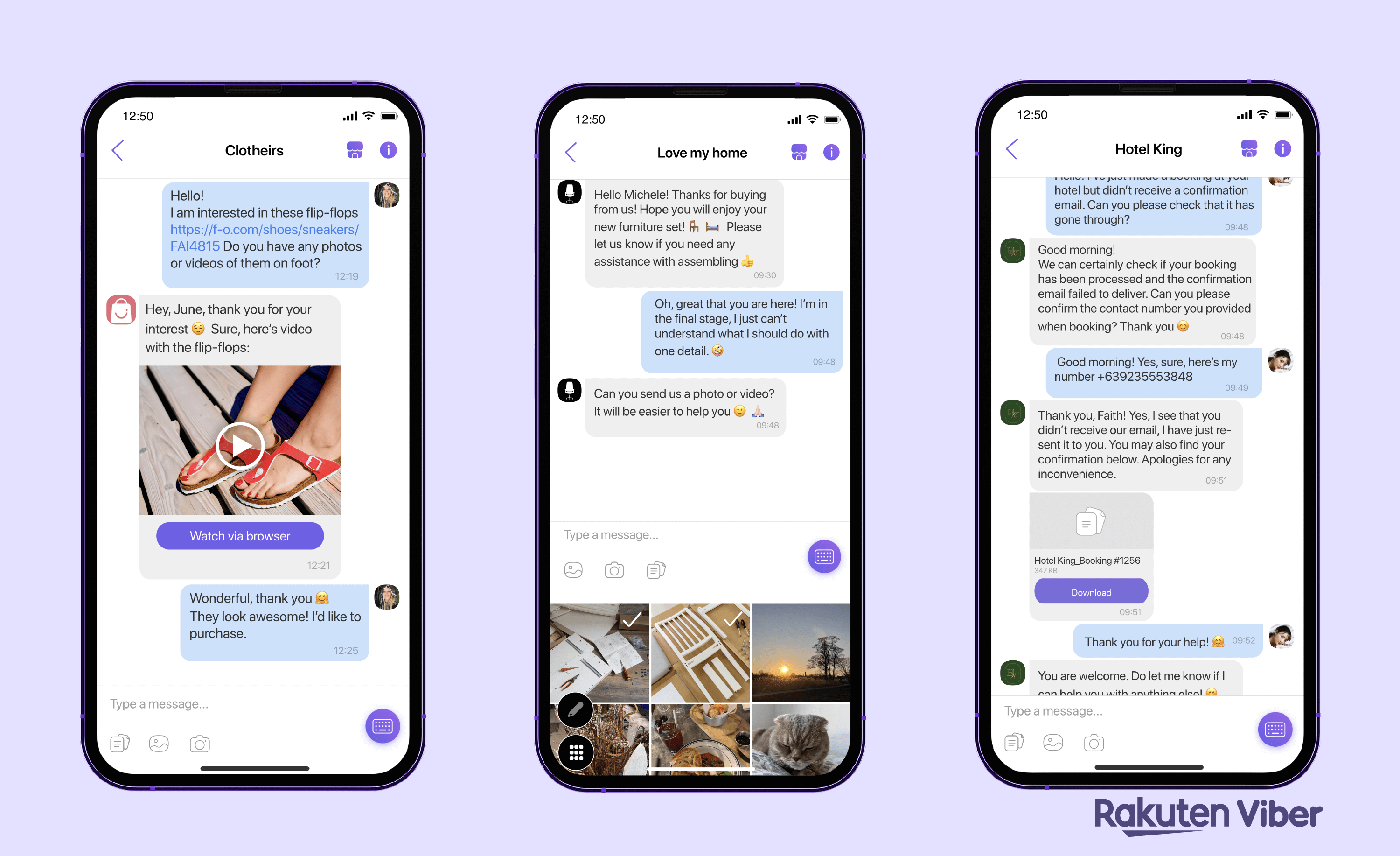
Source: Viber for Business: The Types and Advantages of Viber Business Messages
Conversational messaging is Viber's category for two-way customer interactions. When a customer messages your business, Viber opens a 24 hour session window. Outbound messages you send inside that window are billed as a single flat session fee instead of individually, making multi-message support conversations financially viable.
Your integration does not change. You send the same free-form messages using the same API. Viber manages the session lifecycle on its side: when your outbound message falls within an active session, Viber returns a session ID in its response, and 8x8 processes that signal and bills the message at the session rate. If no session is active, the message is sent and billed at the regular promotional rate.
When to Use Conversational Messaging
Conversational messaging is valuable whenever a customer's inbound message leads to a back-and-forth exchange rather than a single outbound reply. Because the session fee covers all outbound messages in the window, a conversation that takes ten replies to resolve costs the same as one that takes two.
Common use cases:
- Pre-sales inquiries: a customer asks about a product, you respond with details, images, or video, and the conversation continues until they are ready to buy.
- Post-purchase support: a customer asks about their order, assembly instructions, or a booking confirmation, and resolution takes several exchanges.
- Customer service: a customer reports an issue, you troubleshoot, share files or documents, and close the ticket, all within one conversation.
- Multi-turn bot or agent flows: automated flows that ask follow-up questions, wait for replies, and branch based on the customer's response.
Conversational messaging cannot help with business-initiated outbound messages. A session only opens when the customer messages first. Anything you send without a prior inbound from that customer, such as an order confirmation, delivery update, or OTP, is never inside a session and is billed at the regular per-message rate.
How a Session Works
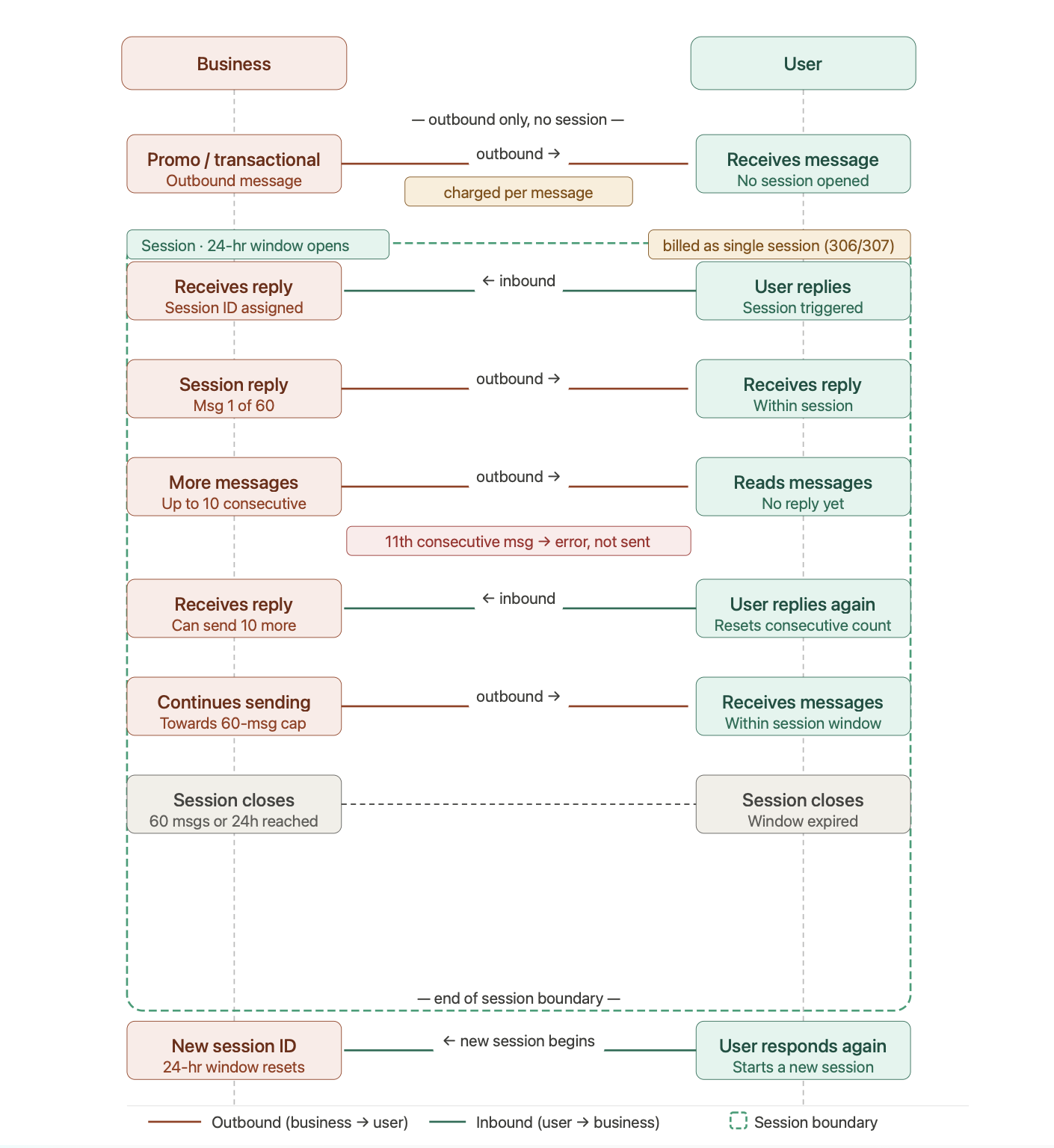
A session is managed entirely by Viber. 8x8 processes the session signals Viber returns and handles billing accordingly.
- You send an outbound message (no session). Without a prior inbound from the customer, there is no active session. The message is sent and billed at the regular per-message rate (promotional or transactional depending on content type).
- The customer replies. This inbound message triggers Viber to open a 24 hour session window. Viber assigns a session ID.
- You reply within the session window. Viber recognizes your outbound message falls within an active session and returns the session ID in its response. 8x8 processes this signal and bills the message at the flat session rate. This first outbound message in the window carries the session fee.
- You continue the conversation. Further outbound messages within the same session carry no additional Viber message fee. You can send up to 10 consecutive outbound messages without a customer reply, and up to 60 outbound messages total per session.
- The customer replies again. Each customer reply resets the 10-message consecutive counter, allowing you to send another 10 outbound messages before needing a reply.
- The session closes. The session ends when the 24 hour window expires or the 60-message outbound limit is reached, whichever comes first. After the session closes, the next inbound message from the customer opens a new session with a new session ID.
📘
A business cannot open a session. Only an inbound message from the customer triggers Viber to start the window.
What You Can Send in a Session
You send the same free-form messages you would send outside a session. The API request is identical. Viber determines whether the message qualifies for session billing based on whether an active session exists for that customer.
Session-eligible message types are text, image, and file. When sent within an active session, these are billed at the flat session rate.
Other message types (video, buttons, carousel) can still be sent during an open session window, but Viber bills them at their regular promotional rate, not the session rate. This means a single conversation can contain a mix of session-rated and per-message-rated content.
If no active session exists when you send a message, it goes through as a regular promotional or transactional message and is billed accordingly.
Limits
| Limit | Value | What happens at the limit |
|---|---|---|
| Session duration | 24 hours from the opening inbound message | The session closes. Later outbound messages are billed at the regular per-message rate |
| Total outbound messages per session | 60 | The session ends. A new session begins if the customer sends another inbound message |
| Consecutive outbound messages without a customer reply | 10 | The 11th message fails with error 2014 (Viber error 21: SRVC_WAIT_FOR_USER_RESPONSE). The message is not sent |
The consecutive-message limit resets each time the customer replies. A back-and-forth conversation never approaches it; a one-sided burst of replies does.
🚧
Both the 60-message total and 10-message consecutive limits are enforced by Viber, not by 8x8. Design your agent or bot flows so that a customer reply is expected before the tenth consecutive outbound message. See Delivery Error Codes.
How Session Messages Are Rated
| Situation | Rating |
|---|---|
| First outbound message inside an open session (text, image, or file) | Flat session fee, charged once |
| Later outbound messages inside the same session (text, image, or file) | No additional Viber message fee |
| Video, button, or carousel sent during an open session window | Billed at the regular promotional rate, not the session rate |
| Outbound message with no open session | Billed at the regular per-message rate (promotional or transactional depending on content type) |
| Inbound messages | No Viber message fee |
Because the session fee covers up to 60 outbound messages over 24 hours, a long support conversation costs roughly the same as a short one. Session rates are set per country. See Billing for how Viber traffic is rated overall.
Enabling Conversational Messaging
Conversational messaging is enabled per channel by 8x8. Contact your account manager to have it turned on for your Viber channel.
Until it is enabled, all outbound Viber traffic is billed per message at the regular rate.
Identifying Session Messages in Delivery Receipts
🚧 Coming soon
The fields below are not yet present in delivery receipts. They are in development. Until they ship, delivery receipts do not distinguish session traffic from per-message traffic.
Once available, delivery receipts for Viber will carry a viber object describing how the message was rated:
{
  "viber": {
    "providerErrorCode": "",
    "pricingCategory": "session",
    "billable": true
  }
}
| Field | Values | Meaning |
|---|---|---|
providerErrorCode | Viber error code, or empty | The raw code Viber returned, when one was provided |
pricingCategory | session, transactional, promotional | How the message was rated |
billable | true, false | Whether this specific message carried a charge |
Within a session, the first outbound message returns billable: true and later messages return billable: false. Outside a session, every message returns billable: true.
Next Steps
| If you want to | Read |
|---|---|
| Understand how Viber traffic is rated overall | Billing |
| Receive the inbound messages that open a session | Webhooks and Delivery Receipts |
| See all promotional message formats with screenshots and payloads | Promotional Message API Library |
| Send transactional or OTP content that requires a template | Transactional Message API Library |
| Review message categories | Concepts & Fundamentals |
| Revisit the business case and full page map | Viber Hub |