Transactional Message API Library
Viber requires pre-approved templates for all Transactional and OTP content. Each entry below shows both the Create Template and Send Template payloads. Template rules, lifecycle, and the July 2026 migration guide follow the table.
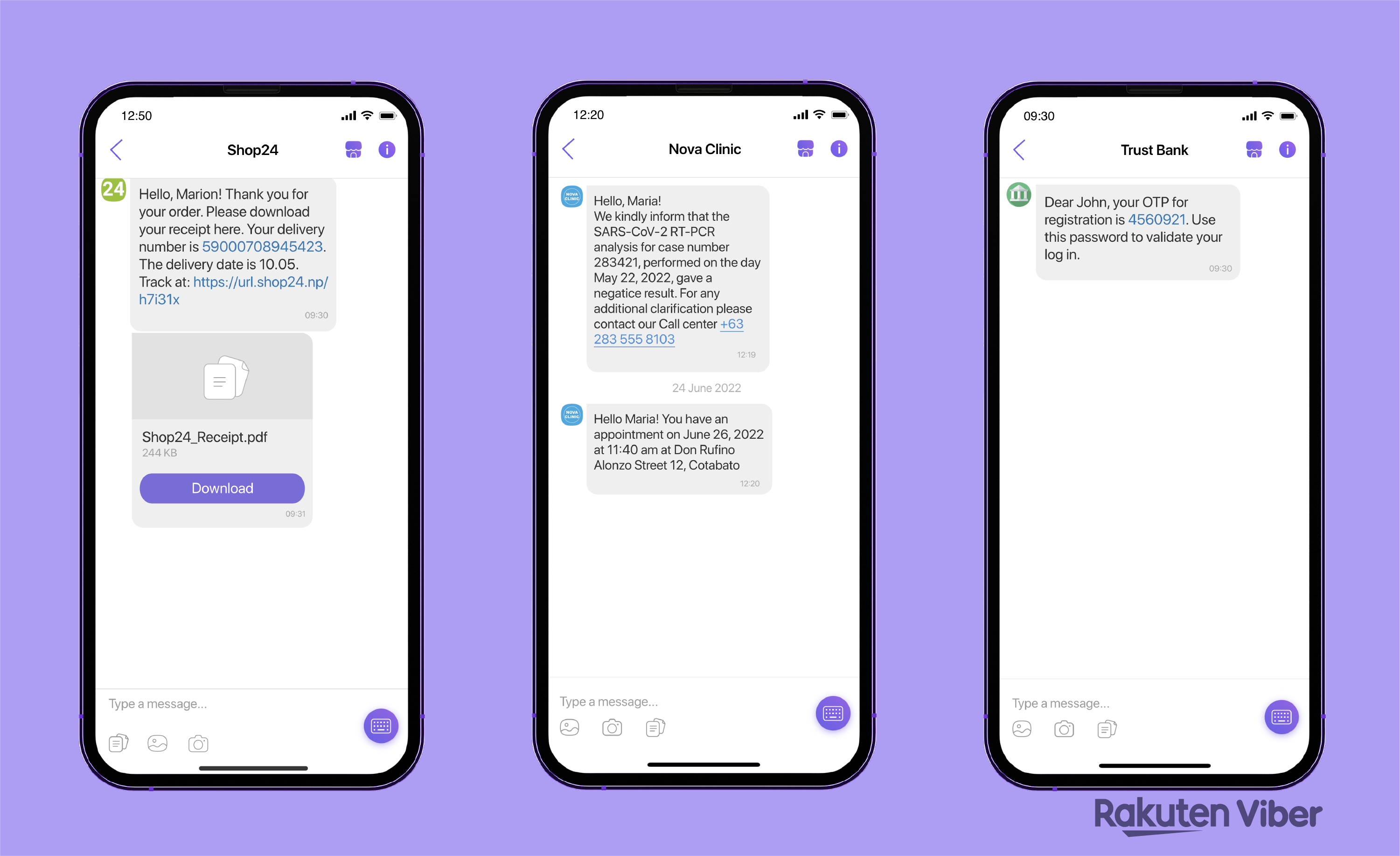 Source: Viber for Business: The Types and Advantages of Viber Business Messages
| Template Type | API Payloads |
|---|---|
Utility Template | Create Template: Register a transactional template with up to 5 text placeholders. The body must start and end with static text, and consecutive placeholders are not allowed. View JSONSend Template: Send the approved template by name and language. Provide parameter values in View JSON |
OTP Template | Create Template: Register an OTP template. The body must contain the View JSONSend Template: Send the approved OTP template with the generated pin value. The same send structure applies. Include SMS fallback for delivery assurance. View JSON |
Template Rules
Viber rejects a template at submission if its body breaks any of these rules. These are structural validation failures, not moderation decisions, so 8x8 returns them immediately rather than waiting on Viber's review.
| Rule | Detail |
|---|---|
| Length | 1 to 875 characters |
| Must start with static text | {{name}}, hello is rejected |
| Must end with static text | Your code is {{pin}} is rejected. Add a trailing word, sign-off, or period |
| No consecutive placeholders | {{first}} {{last}} is rejected. Put static text between them |
| OTP needs a pin | An OTP template whose body has no {{pin}} placeholder is rejected |
Naming and Identification
Viber identifies each template internally by a UUID it generates. 8x8 layers a friendlier identity on top: you choose a name, and a template is uniquely identified by that name plus its language, scoped to your channel.
You use the name everywhere in your integration: creating, sending, and deleting. 8x8 stores the mapping to Viber's UUID and resolves it internally, so the UUID never appears in your requests.
Because one template holds exactly one language, supporting English, Thai, and Indonesian for the same message means registering three templates: the same name, a different language value on each. At send time, you select between them by supplying that language value.
Limits
These limits apply to every template, regardless of category.
| Limit | Value |
|---|---|
| Placeholders per template | 5 |
| Placeholder type | TEXT only |
| Placeholder name | 50 characters, English characters only |
| Example value | 100 characters |
| Languages per template | 1 |
| Templates per Viber Service ID | 2,000, counting every status |
| Value length at send time | 25 characters per placeholder |
| URLs in placeholder values | Not permitted. Hard-code any URL into the body |
| Approval time | Up to 24 hours |
Note A URL cannot be passed as a placeholder value. If your message needs a link that varies per recipient, that content cannot be sent as a Viber template. Static links must be written into the template body and approved with it.
Lifecycle
Submit  ->  Pending  ->  Approved
                     ->  Declined
| Status | Meaning |
|---|---|
Pending | Submitted and queued for moderation. Cannot be used to send |
Approved | Moderated and usable in send requests |
Declined | Rejected during moderation, commonly for a content policy breach. Cannot be used to send |
Approval takes up to 24 hours. Viber reports the outcome to 8x8, which forwards the event to your webhook, identifying the template by the name you chose rather than Viber's internal identifier, so you do not need to poll. See Webhooks and Delivery Receipts.
A Declined template cannot be corrected in place. See Templates Cannot Be Edited for what to do next.
Templates Cannot Be Edited
Viber templates are immutable once created. There is no update operation, at Viber or through 8x8: to change any part of a template, including fixing a typo, you delete it and create a replacement. The replacement goes back through moderation and waits up to 24 hours before it can send.
Note Template deletion through the 8x8 API is still rolling out. See Sending Viber Messages over API for current availability, and contact your account manager if you need a template removed in the meantime.
Plan for this:
- Build approval time into your release cycle. A template needed for tonight's traffic cannot be created this afternoon.
- Treat wording changes as a scheduled change, not a hotfix.
- Recreate under the same name and language. Because you address templates by name rather than Viber's UUID, a replacement with the same name and language keeps your send code unchanged.
What Changed on July 15, 2026
On July 15, 2026, Viber made pre-approved templates mandatory for Transactional and OTP content. Free-form text is no longer accepted for either category; if you send it anyway, Viber rates it as Promotional instead. Promotional content itself is unaffected and continues to use free-form content as before.
| Area | Before | Now |
|---|---|---|
| Sending transactional content | Free-form text composed per send | A registered template referenced by name, with values for its placeholders |
| Rating of free-form text | Transactional | Promotional |
| Time to launch a new message | Immediate | Up to 24 hours for template moderation |
| Changing wording | Edit the text in your send call | Delete the template and create a replacement |
| OTP presentation | Plain text | Card layout with a Copy button |
| Multi-language | One send call, different text | One template per language |
This section is for teams already sending Viber traffic through 8x8 who need to move existing transactional and OTP messages onto templates.
Who Is Affected
You are affected if you send any of the following over Viber:
- One-time passwords and verification codes
- Order confirmations, dispatch and delivery updates
- Account notices, payment reminders, appointment confirmations
You are not affected if you send only Promotional content. Promotional messages do not use templates and continue to work unchanged.
How to Migrate
- Inventory your transactional messages. List every distinct Transactional and OTP message shape you send, grouped by wording rather than recipient. Two messages that differ only in a name, a code, or an order number are one template with placeholders. Work out which parts vary; those become placeholders, and everything else is static text locked in at approval.
- Check each message against the rules. See Template Rules and Limits above for the complete constraints on length, placeholders, and send-time values. A message that needs a link which varies per recipient cannot be sent as a template; a fixed link can be written into the body and approved with it.
- Register your templates. Create each template through the Template Management API, choosing a name you will reuse in your send calls. Register one template per language: the same name, a different
languagevalue on each. Submit well ahead of when you need to send; moderation takes up to 24 hours. - Switch your send calls. Change Transactional and OTP sends from free-form content to a template send, supplying the template name, its language, and a value for each placeholder. The endpoint, authentication, and subaccount stay the same. Keep your SMS fallback configured: any failed Viber send still falls back to SMS using
fallbackText. - Verify. Send to a test recipient and confirm the rendered text matches what you expect, the OTP Copy button appears where it should, and the delivery receipt shows a successful send.
Common Errors During Migration
| Symptom | Likely cause |
|---|---|
| Send rejected before reaching Viber | The template name does not resolve, is not yet Approved, or the supplied placeholders do not match the definition |
Error 2020 | Template not found, deleted, or not owned by this service |
Error 2021 | Supplied parameters do not match the template definition |
Error 2006 | A genuine Viber timeout, or an OTP template sent without a pin value; both surface as the same code |
| Template declined at moderation | The wording breached Viber's content policy. Revise and create a replacement |
See Delivery Error Codes for the full list.
Planning Notes
- Approval time is up to 24 hours. Register templates as part of the change that introduces them, not on the day you need them.
- Templates cannot be edited. Correcting wording means deleting and recreating under the same name and language; see Templates Cannot Be Edited.
- Each Viber Service ID holds up to 2,000 templates, counting every status. Prune templates you no longer send as you migrate.
Contact your account manager if you need help scoping which of your traffic is affected or getting template registration enabled on your account.