Tutorial: Learn how to use the Callflow API for sending Voice Messages
Introduction
8x8 offers different API methods that allow you to send Voice Messages programmatically.
In this guide, we focus on the simplest method: using the Voice Callflows API to:
- Place an outbound call
- Play a TTS (Text-To-Speech) message or an audio file
- Hang up when playback is complete
If you follow the steps in this tutorial, you will send a Voice Message directly from your command line using a simple curl command.
In this tutorial, we are going to send a Voice Message to the mobile phone number +6512345678 registered on a Singapore network (+65) using curl.
We are going to use:
- Subaccount ID:
acme_corp - Example caller ID (source):
+6512341234
Replace these values with your own in a real implementation.
Prerequisites
- Command-line interface compatible with
curl - 8x8 CPaaS account with Voice enabled
apiKey(Bearer token)- 8x8 CPaaS Voice
subaccountId - Destination phone number (E.164 format recommended, for example
+65xxxxxxxx) - Voice Message content (TTS text or audio file URL)
Callflow overview
Below is a sample Voice Message call scenario. When the API call is made, the 8x8 Voice Platform:
- Places an outbound call to the MSISDN
+6512345678 - Plays either a TTS message or an audio file
- Hangs up when the playback is done
Description of the callflow
- An outbound call is made to a user by making an API request to the Callflows API.
- The customer picks up the call and hears the Voice Message.
- The call immediately hangs up as soon as the message is played.
Diagram of the callflow
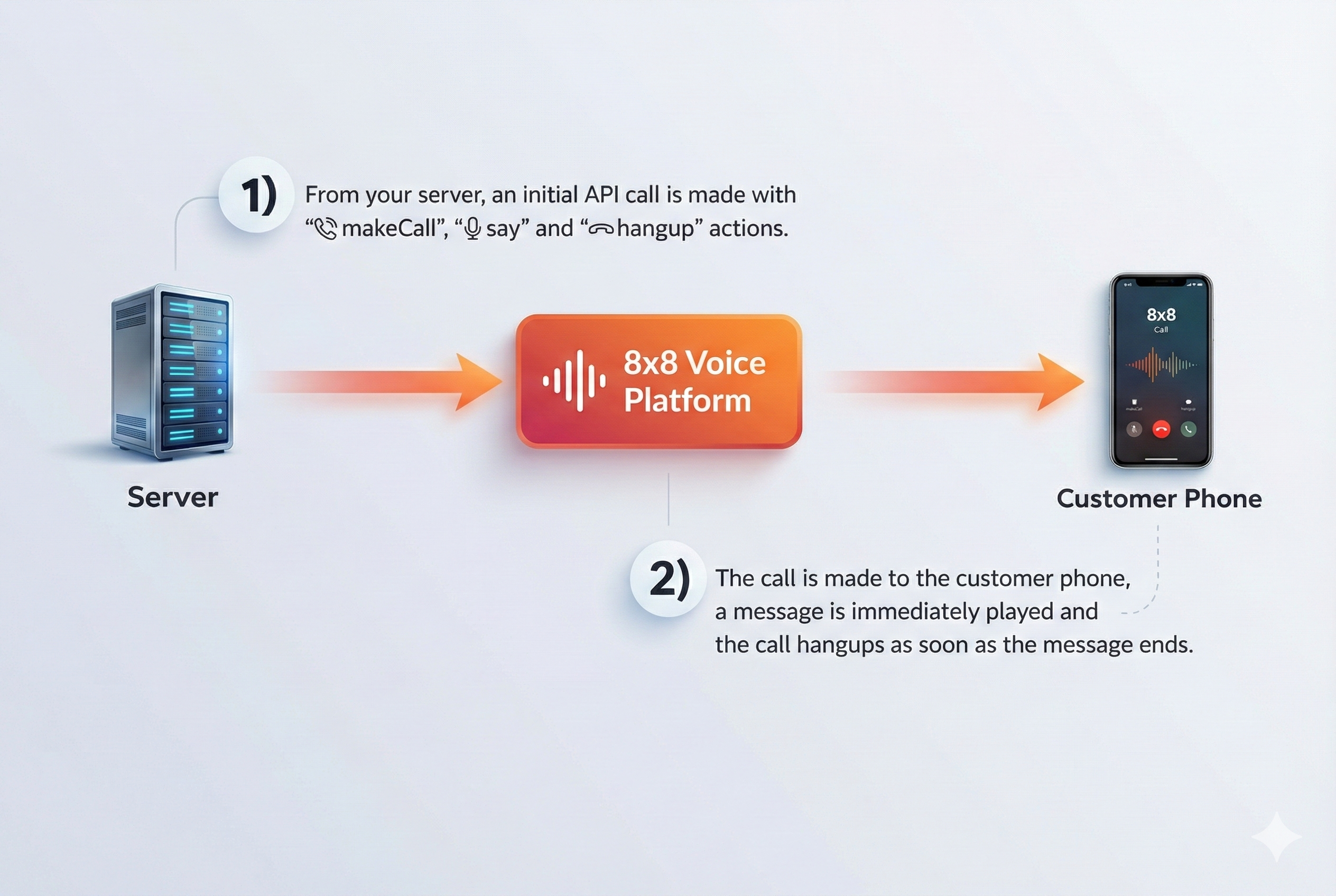
Callflow actions used in a Voice Messaging scenario
A simple Voice Messaging callflow uses:
makeCall- initiates the outbound callsayorplayFile- plays the voice messagehangup- terminates the call
For complete action documentation, see Callflow Actions.
The Callflows API endpoint is:
POST https://voice.8x8.com/api/v1/subaccounts/{subaccountId}/callflows
Sample Voice Messaging requests
Sample Voice Messaging request (TTS)
{
  "validUntil": "<utc_timestamp>",
  "callflow": [
    {
      "action": "makeCall",
      "params": {
        "source": "+6512341234",
        "destination": "+6512345678"
      }
    },
    {
      "action": "say",
      "params": {
        "text": "Hello, this is a test Voice Message.",
        "voiceProfile": "en-IE-EmilyNeural",
        "repetition": 1,
        "speed": 1
      }
    },
    {
      "action": "hangup"
    }
  ]
}
Sample Voice Messaging request (playFile)
{
  "validUntil": "<utc_timestamp>",
  "callflow": [
    {
      "action": "makeCall",
      "params": {
        "source": "+6512341234",
        "destination": "+6512345678"
      }
    },
    {
      "action": "playFile",
      "params": {
        "fileUrl": "https://sample-videos.com/audio/mp3/wave.mp3",
        "repetition": 2
      }
    },
    {
      "action": "hangup"
    }
  ]
}
Callflow actions
makeCall
- Creates an outbound voice call to the specified destination with the caller ID specified as
source. sourceanddestinationvalues must be valid MSISDNs in E.164 standard (the+prefix is accepted).- Once the call is answered by the receiving party, the rest of the callflow actions will be executed in sequence.
- If two
makeCallactions are used in the same callflow, the second call will be bridged to the first call once answered. - Call conferencing is not supported; the maximum allowed
makeCallactions in a callflow is 2. - The subsequent actions in the callflow will be executed on the call(s) created by the
makeCallaction, somakeCallmust be the first action in a callflow. - Allowed destinations to dial depend on the customer account’s coverage (contact your account manager for any changes).
- For local outbound calls (source and destination in the same country), the
source(caller ID) must be a registered MSISDN under the account. - For international outbound calls, regulatory rules may cause the call to be rejected if caller ID rules are not respected.
{
  "action": "makeCall",
  "params": {
    "source": "+6512345678",
    "destination": "+6587654321"
  }
}
say
- Converts the given text into speech and plays it in the currently active call.
voiceProfiledefines the characteristics of the generated speech. A non-comprehensive list of supported voice profiles can be found here: Voice languages and profiles.repetitioncontrols how many times the speech is played back.speedcontrols the speed of the speech.
{
  "action": "say",
  "params": {
    "text": "Hello, this is a Voice Message.",
    "voiceProfile": "en-US-ZiraRUS",
    "repetition": 1,
    "speed": 1
  }
}
playFile
- Downloads the sound/voice file given by
fileUrland plays it back in the currently active call. - Supported file types are
wavandmp3. - Files larger than 5 MB are not accepted.
- Downloaded voice files are cached for 1 hour for faster access in subsequent requests. If the file content changes within 1 hour, change the file name so the updated content is used.
repetitioncontrols how many times the file is played (default is1).
{
  "action": "playFile",
  "params": {
    "fileUrl": "https://sample-videos.com/audio/mp3/wave.mp3",
    "repetition": 1
  }
}
hangup
- Disconnects the active call.
- If there are two calls in the session, both will be disconnected.
- This terminates the session and triggers the session summary webhook.
{
  "action": "hangup"
}
Example: initial API call to place the outbound Voice Message
This is the URL to send the API request to:
POST https://voice.8x8.com/api/v1/subaccounts/{subaccountId}/callflows
Complete TTS example
{
  "validUntil": "2024-07-03T05:59:32.226Z",
  "callflow": [
    {
      "action": "makeCall",
      "params": {
        "source": "+6512341234",
        "destination": "+6512345678"
      }
    },
    {
      "action": "say",
      "params": {
        "text": "Hello, this is a test Voice Message.",
        "voiceProfile": "en-IE-EmilyNeural",
        "repetition": 1,
        "speed": 1
      }
    },
    {
      "action": "hangup"
    }
  ]
}
Complete playFile example
{
  "validUntil": "2024-07-03T05:59:32.226Z",
  "callflow": [
    {
      "action": "makeCall",
      "params": {
        "source": "+6512341234",
        "destination": "+6512345678"
      }
    },
    {
      "action": "playFile",
      "params": {
        "fileUrl": "https://sample-videos.com/audio/mp3/wave.mp3",
        "repetition": 2
      }
    },
    {
      "action": "hangup"
    }
  ]
}
curl example (TTS)
Putting together URL, authentication, and data payload, the curl command looks like:
curl -X "POST" "https://voice.8x8.com/api/v1/subaccounts/acme_corp/callflows" \
  -H "Authorization: Bearer 5DhZxZRILVPKjXuFWsd7QGZ**********31n19pYmg" \
  -H "Content-Type: application/json" \
  -d '{
    "validUntil": "2024-07-03T05:59:32.226Z",
    "callflow": [
      {
        "action": "makeCall",
        "params": {
          "source": "+6512341234",
          "destination": "+6512345678"
        }
      },
      {
        "action": "say",
        "params": {
          "text": "Hello, this is a test Voice Message.",
          "voiceProfile": "en-IE-EmilyNeural",
          "repetition": 1,
          "speed": 1
        }
      },
      {
        "action": "hangup"
      }
    ]
  }'
API response
Success
{
  "sessionId": "d9874358-89ac-4c50-bbab-1eb634482a94",
  "sessionStatus": "CREATED",
  "callFlowRequestId": "89b545a5-0676-11ee-8100-d500c0d203fc",
  "statusCode": 1,
  "statusMessage": "Created"
}
Failure
{
  "sessionStatus": "NOT_CREATED",
  "callFlowRequestId": "0564e804-0a7e-11ee-9c83-6df9c048a122",
  "statusCode": -1002,
  "statusMessage": "Speech profile or language parameter invalid"
}
Session status
sessionStatus indicates whether a call was successfully accepted and created on the 8x8 platform.
CREATED– Call is successfully created on the platform.NOT_CREATED– Call is not successfully created on the platform. UsestatusCodeandstatusMessageto understand why the call was not accepted.
Status codes
statusCode and statusMessage describe whether the callflow request was accepted and why.
Common examples:
1– Created- Negative values – validation or callflow errors (invalid JSON, wrong action order, invalid MSISDN, and similar issues)
For the complete list of statusCode values and their messages, see the
Voice Status Codes and Status Messages reference.
Session summary upon termination
Upon termination of the session, a Voice Session Summary (VSS) is returned via webhook.
If you need to restrict inbound traffic to your webhook endpoints, see Voice IP Addresses for the list of outbound IPs used by 8x8 Voice services.
To learn more about the Voice Session Summary payload and fields, see the Session status documentation.
Error Handling
For error codes that may appear in the Voice Session Summary, see the Voice Error Codes reference. For API response status codes, see Voice Status Codes and Status Messages.
Support Channels
- Technical support: support@cpaas.8x8.com
- Sales inquiries: Contact your account manager or visit cpaas.8x8.com/en/contact-us
- Support Portal: https://support.cpaas.8x8.com/hc/en-us