IVR - Introduction
Overview
8x8 IVR is built on our programmable voice capabilities. 8x8 Interactive Voice Response Service is an automated telephone system that combines pre-recorded messages or text-to-speech (TTS) technology with a dual-tone multi-frequency (DTMF) interface to provide real-time user interaction over the Public Switched Telephone Network.
IVR can be used for interactive outbound call outreach and for handling inbound calls to improve the customer experience by providing a self-service method for customers.
Actions (methods) that can be used in a predefined IVR flow:
- Say – Plays synthesized speech into the current call using text-to-speech.
- SayAndCapture – Plays a voice file (or TTS) into the call, then captures the caller’s DTMF input and reports it back via the Voice Call Action (VCA) webhook.
- makeCall – Initiates an outgoing call to the desired destination. This function should be used to connect the first call with another party.
- playFile – Downloads the sound/voice file provided and plays it back in the currently active call.
- Hangup – Disconnects all active calls. This terminates the session and triggers the session summary webhook.
Main Voice IVR features include:
- Wide range of languages – use the Voice Profile API to retrieve the full range of voice profiles
- User input support over DTMF
- Voice Call Action webhook
- Dedicated local numbers where applicable
- Billing per successful call
- Detailed reports and statistics
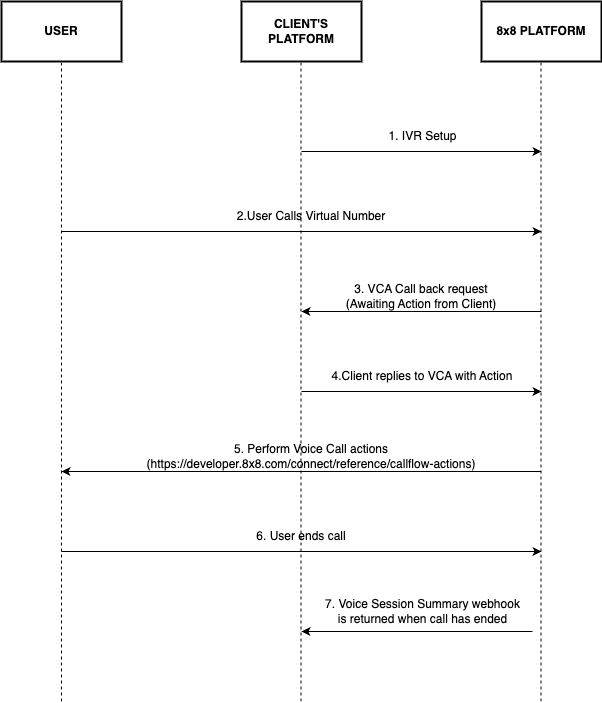
IVR flow
The diagram below shows a simple inbound IVR flow:
Related Guides
Getting Started
-
Simple IVR Guide – Build your first IVR menu with step-by-step examples. Perfect for beginners who want to create basic phone menus with DTMF input.
-
Advanced IVR Guide – Learn advanced techniques like nested menus, database integration, and complex call routing logic.
Technical References
-
Voice Call Action Webhook Guide – Understand how Voice Call Action (VCA) webhooks work across all 8x8 voice products (IVR, Number Masking, Voice Messaging). Learn about webhook payload structure and how to respond dynamically.
-
IVR Call Action Handling – Detailed documentation on handling VCA webhook callbacks specifically for IVR, including payload examples and response structures.
Setup Guides
- Webhook Setup Guide for IVR – Configure your webhook endpoints to receive IVR events.
Prerequisites
Before you get started, please contact your account manager to ensure that your account has access to this product and that the following points have been managed:
- You will need a new sub-account ID to enable and set up 8x8’s IVR service.
- To use our inbound IVR product, you require a Virtual Number that will be allocated to your sub-account by our 8x8 team.
- You will need to set up and configure an endpoint where the Voice Call Action webhook will be sent. You can use the Webhooks APIs to set up your endpoints. Once that is completed you are ready to use our IVR product and begin building your call flows.
Related Documentation
-
IVR Guides:
-
Webhooks:
- Session Summary (IVR) - Detailed payload reference
- Voice Call Action Webhook Guide
- Voice Session Summary Webhook
-
API Reference:
Error Handling
For error codes that may appear in the Voice Session Summary, see the Voice Error Codes reference. For API response status codes, see Voice Status Codes and Status Messages.
Support Channels
- Technical support: support@cpaas.8x8.com
- Sales inquiries: Contact your account manager or visit cpaas.8x8.com/en/contact-us
- Support Portal: https://support.cpaas.8x8.com/hc/en-us