Simple IVR Guide
Simple IVR
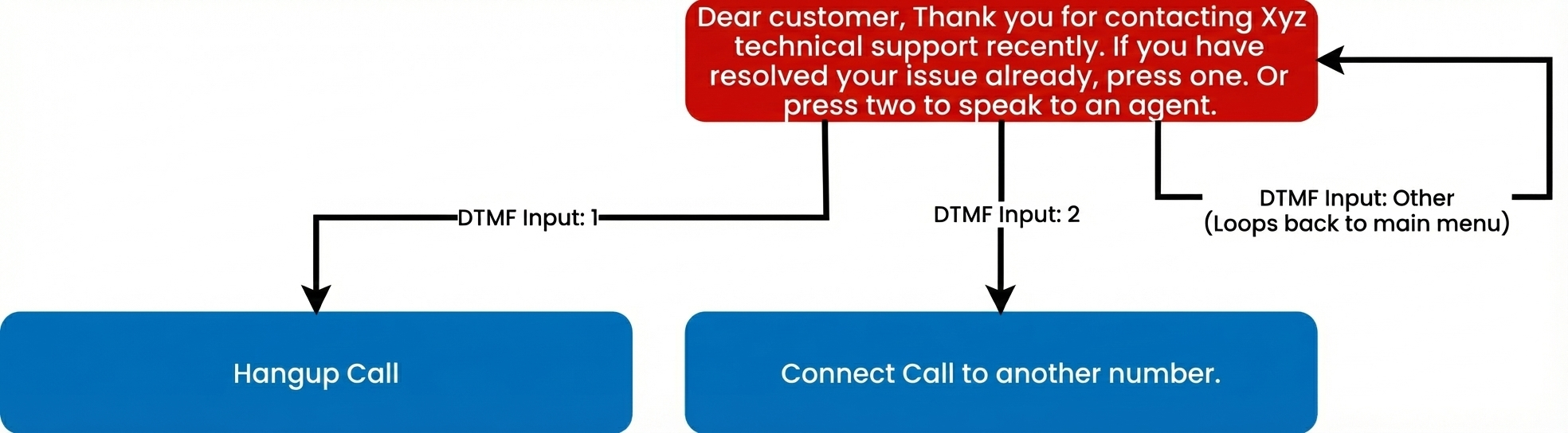
Below is a sample of a simple IVR call scenario. The Callflow below demonstrates an example scenario where a callback is placed to a customer seeking technical support. Then in the same call the user has the ability to either contact a member of technical support, end the call or repeat the main menu.
Demo Video
This video will show a demo of how the Advanced IVR menu will work, including showing webhooks and the Initial API Call.
Diagram of Simple IVR Flow
Below is a description of the IVR Tree that we will be building with this call scenario. There are 3 possible paths and only 1 level in this simple IVR Tree.
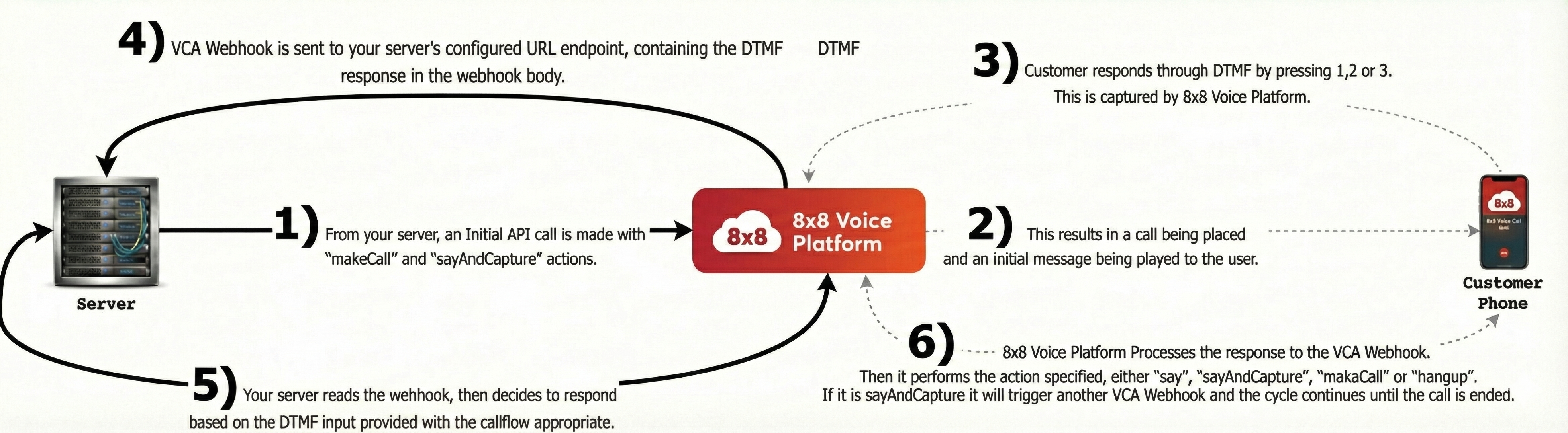
Webhooks and API Calls in Simple IVR Flow
Below is a diagram of how the webhooks and API Calls from your server will work with the 8x8 Voice Platform to create this IVR.
Example of initial API call to place outbound call
This is the URL to send the initial API request to.
POST voice.8x8.com/api/v1/subaccounts/{sub-account-id}/callflows
This is the request body to send the API request to as well. Note, you will need to replace the source with a 8x8 virtual number in your account and destination with a destination phone number to call.
Sample of Simple IVR Request
{
    "callflow": [
          {
            "action": "makeCall",
            "params": {
              "source": "6561115777",
              "destination": "6512345678"
              }
        },
        {
          "action": "sayAndCapture",
          "params": {
              "promptMessage": "Dear customer, Thank you for contacting Xyz technical support recently. If you have resolved your issue already, press one. Or press two to speak to an agent.",
              "voiceProfile": "en-US-BenjaminRUS",
              "repetition": 1,
              "speed": 1,
              "minDigits": 1,
              "maxDigits": 1,
              "digitTimeout": 10000,
              "overallTimeout": 10000,
              "completeOnHash": false,
              "noOfTries": 2,
              "successMessage": null,
              "failureMessage": "Invalid input, please try again"
              }
        }
    ]
}
Example Response Body for an Callflows API request
Below are examples of successful and failure responses to the API request above. Depending on the error the status message may change.
Success
{
    "sessionId": "d9874358-89ac-4c50-bbab-1eb634482a94",
    "sessionStatus": "CREATED",
    "callFlowRequestId": "89b545a5-0676-11ee-8100-d500c0d203fc",
    "statusCode": 1,
    "statusMessage": "Created"
}
Failure
{
    "sessionStatus": "NOT_CREATED",
    "callFlowRequestId": "0564e804-0a7e-11ee-9c83-6df9c048a122",
    "statusCode": -1002,
    "statusMessage": "Speech profile or language parameter invalid"
}
Explaining Session Status in Callflows Response Body
Session status indicates if a call is successfully accepted & created or not created on the 8x8 platform. 8x8 returns two status:
CREATED- call is successfully created on the platform.NOT CREATED- call is not successfully created on the platform and 8x8 returnsstatusCodeandstatusMessageto understand why the call was not accepted on the platform
Status Code and Status Message
| Status Code | Message |
|---|---|
| 1 | Created |
| -1001 | Invalid JSON request body |
| -1002 | Speech profile or language parameter invalid |
| -1003 | Valid maxDigits required when minDigits provided |
| -1005 | Valid overallTimeout is required when digitTimeout provided |
| -1007 | $.callflow[0].action should be one of: [Call action names] Eg: $.callflow[0].action should be one of: say,playFile,sayAndCapture |
| -1008 | Valid maxDigits is required when completeOnHash is false |
| -1009 | Invalid call flow entry provided. [Additional error details here]. Eg: Invalid call flow entry provided. $.callflow[0].params.text: is missing but it is required |
| -9999 | An unknown error has occurred |
Webhook Example
Once the initial call is made, the server will be sent a webhook with call status information:
{
  "payload": {
    "eventId": "e2078079-eae8-11f0-ae64-a500004e488e",
    "callId": "e1ff6a14-eae8-11f0-baa6-c93abb37794a",
    "sessionId": "e1ff6a15-eae8-11f0-baa6-c147150ab00e",
    "subAccountId": "8x8_test",
    "callStatus": "CALL_RECEIVED",
    "callDirection": "INBOUND",
    "callType": "PSTN",
    "source": "+656833033",
    "destination": "+94778066434",
    "sourceFormat": "MSISDN",
    "destinationFormat": "MSISDN",
    "sourceCountryCode": "SG",
    "destinationCountryCode": "LK",
    "callDuration": 0,
    "sipCode": 200,
    "timestamp": "2026-01-06T10:17:19.375Z"
  },
  "namespace": "VOICE",
  "eventType": "CALL_STATUS",
  "description": "Status update of a call"
}
When the user responds with a DTMF input, your server will receive a VCA webhook and can reply with a callflow response. Below are examples of Callflow responses that trigger corresponding actions.
DTMF Input 1 - Hangup
Responding with the callflow below will immediately end the call.
Digit 1
{
    "callflow": [
          {
          "action": "hangup"
        }
    ]
}
DTMF Input 2 - Connect Call
Responding with this callflow will connect the existing call to a different number.
Digit 2
{
    "callflow": [
          {
          "action": "makeCall",
          "params": {
            "source": "6512345678",
            "destination": "6561115777"
            }
        }
    ]
}
DTMF Input Other - Repeat Menu
Responding with this callflow will repeat the main menu.
Any Other Digit
{
    "callflow": [
          {
          "action": "sayAndCapture",
          "params": {
              "promptMessage": "Sorry, we did not understand your response. If you have resolved your issue already, press one. Or press two to speak to an agent.",
              "voiceProfile": "en-US-BenjaminRUS",
              "repetition": 1,
              "speed": 1,
              "minDigits": 1,
              "maxDigits": 1,
              "digitTimeout": 10000,
              "overallTimeout": 10000,
              "completeOnHash": false,
              "noOfTries": 2,
              "successMessage": null,
              "failureMessage": "Invalid input, please try again"
              }
        }
    ]
}
Voice Session Summary Webhook
Upon termination of the session, the Voice Session Summary (VSS) will be returned via webhook. For detailed information about the IVR Session Summary payload, see Session Summary (IVR).
Related Guides
- Session Summary (IVR) – Detailed webhook payload reference for IVR session summaries
- IVR Call Action Handling – Detailed documentation on handling VCA webhook callbacks for IVR, including payload examples and response structures
- Send Callflow API – Complete API reference for the Callflows API used to initiate IVR sessions and control call flow
Error Handling
For error codes that may appear in the Voice Session Summary, see the Voice Error Codes reference. For API response status codes, see Voice Status Codes and Status Messages.
Support Channels
- Technical support: support@cpaas.8x8.com
- Sales inquiries: Contact your account manager or visit cpaas.8x8.com/en/contact-us
- Support Portal: https://support.cpaas.8x8.com/hc/en-us