User-initiated calling
What is User-initiated Calling?
User-initiated calling (UIC) lets customers call your business directly from WhatsApp. The customer always initiates the call.
Entry points a customer can use:
- The call icon in the WhatsApp chat header or business profile
- A
VOICE_CALLbutton on a message template (see below) - A
wa.me/call/deep link on a webpage, in an app, or as a QR code
UIC calls are free. UIC works on all four integration paths (Direct SIP, 8x8 Converse, Genesys, VCC via AI Studio).
Topology
WhatsApp user → Meta —SIP→ 8x8 CPaaS —SIP→ Your SBC / PBX / Contact Center
The Meta ↔ 8x8 leg and the 8x8 ↔ customer leg are both SIP.
When to use
- Customer support and issue escalation
- Sales enquiries
- Order, delivery, or account issues
- Situations where messaging is insufficient or too slow
Geographic availability
UIC is available in most regions where the WhatsApp Cloud API is supported.
- Blocked in sanctioned countries (Cuba, Iran, North Korea, Syria, Ukraine regions).
- Customer's number can be from any Cloud API-supported country.
- Internet (WiFi or mobile data) required.
UIC is available in USA, Canada, Turkey, Egypt, Vietnam, and Nigeria — countries where business-initiated calling is NOT supported.
Call flow
- Customer initiates the call in WhatsApp (call icon, call button, or deep link).
- Meta signals the call to 8x8 over SIP.
- 8x8 delivers the call to your integration path (Direct SIP endpoint, Converse, Genesys, or VCC).
- Your environment routes the call (queue, IVR, skills, agent).
- Agent answers; two-way audio is bridged customer ⟷ 8x8 ⟷ agent.
- Call ends when either party hangs up.
Call entry points
Call icon
Available on the WhatsApp Business number as soon as calling is enabled. No template, no build.
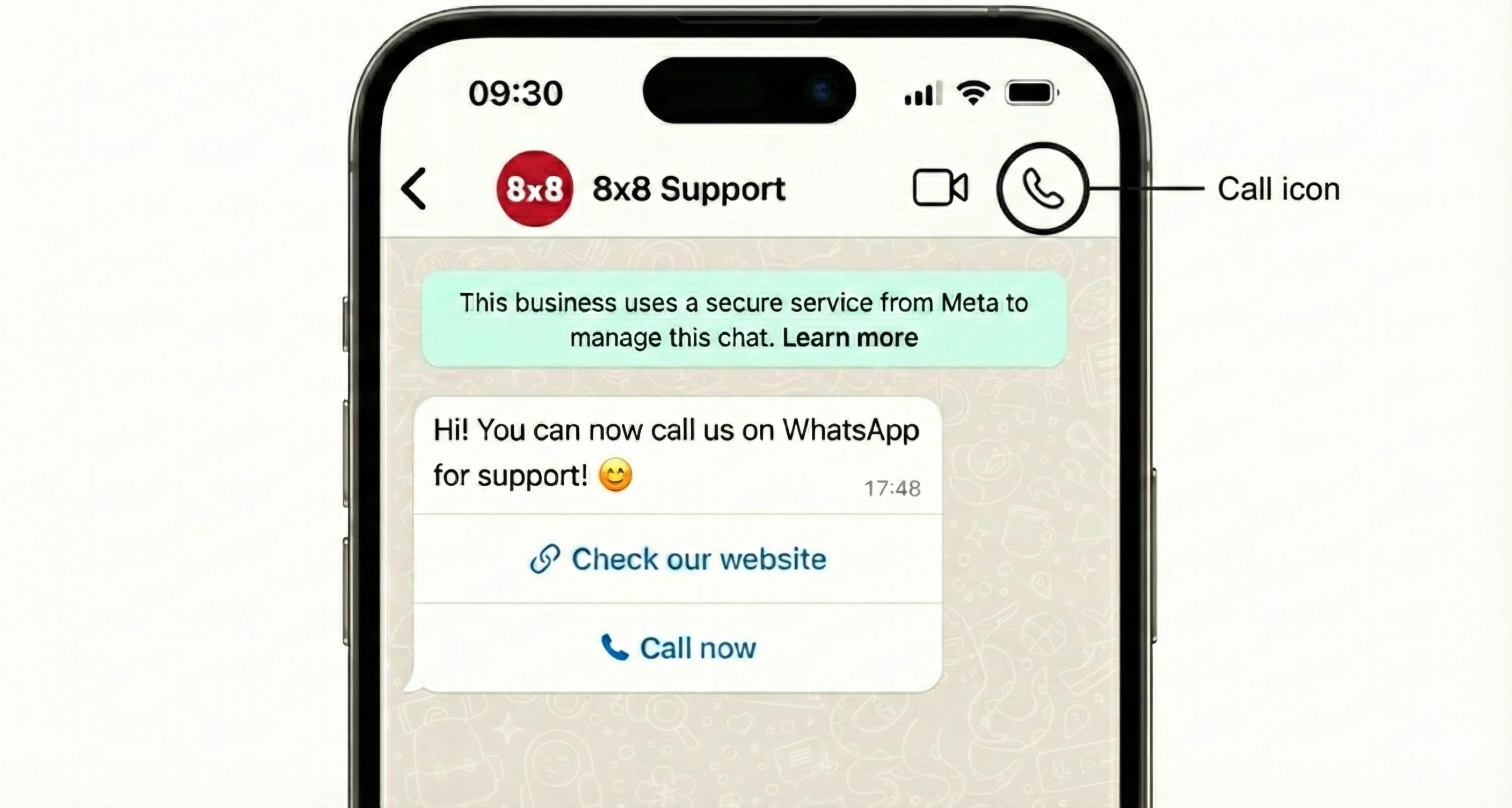
VOICE_CALL button on a template
The call button is optional. UIC works on the call icon alone once calling is enabled — users can call without any template existing. The button is a nudge: it puts a call prompt in front of the user at a chosen moment, adding reach and timing control, not capability.
Template shape:
{
  "name": "template_with_voice_call",
  "language": "en_US",
  "category": "MARKETING|UTILITY",
  "allow_category_change": true,
  "components": [
    { "type": "HEADER", "format": "TEXT", "text": "Appointment Reminder" },
    { "type": "BODY", "text": "You have an upcoming appointment scheduled with us.\n\nIf you need to reschedule or have any questions about your appointment, please call us directly using the button below.\n\nThank you!" },
    { "type": "FOOTER", "text": "We look forward to seeing you" },
    {
      "type": "BUTTONS",
      "buttons": [
        {
          "type": "VOICE_CALL",
          "text": "Call to Reschedule",
          "ttlMinutes": 1440
        }
      ]
    }
  ]
}
| Parameter | Rule |
|---|---|
text | Optional; defaults to Call Now; max 20 characters |
ttlMinutes | 1440–43200 at creation; 1–43200 at send (send value overrides); default 10080 (7 days) |
payload | Optional; max 512 characters; returned in calling webhooks as cta_payload |
A VOICE_CALL button can be combined with other button types (for example, a URL button in the same array).
Send the template via the standard 8x8 ChatApps send-message endpoint (see WhatsApp over 8x8 API).
wa.me/call/ deep links
wa.me/call/<BUSINESS_PHONE_NUMBER>
- Routes a WhatsApp user straight into a call with the business.
- Works on a website, in an app, or as a QR code.
- No template, no approval, no open messaging window, no send charge.
- Optional
?biz_payload=<value>returns asdeeplink_payloadin the calling webhooks. - Can point at a different voice-enabled business number.
- Not supported on WhatsApp desktop clients.
biz_payloadrequires WhatsApp client 2.25.27 or later.
Lowest-effort entry point — no build required.
Attribution
An inbound WhatsApp call otherwise arrives with the caller's number and nothing else, so calls cannot be tied to the message or campaign that produced them.
The payload string on a VOICE_CALL button returns in the connect and terminate webhooks as cta_payload. Businesses can use it to encode an order reference, campaign ID, or conversation ID. 8x8 does not process the value. Requires WhatsApp client 2.25.27 or later.
Availability and after-hours handling
Inbound WhatsApp calls cannot be gated at the WhatsApp end:
- Hiding the call icon does not stop calls. Users still reach the business from a saved contact, the recent calls tab, a call button in a message, or the call bubble left by a previous call.
- There is no way to allowlist individual users for calling. The only targeted mechanism is sending a call button to the users the business wants calling it.
The customer owns two controls, plus one route:
- SIP-side treatment (primary) — closed announcement, voicemail, a queue with limited staffing, or a prompt to continue in chat. Handle availability in the SIP stack.
ttlMinuteson the call button — bounds how long a call prompt stays live, so a prompt sent during business hours does not invite a call at midnight.- Entry-point behaviour — not self-service. Raise through the Support Channels or your account manager.
How call entry points are enabled
- Number enablement and the call icon: 8x8 handles Meta-side enablement.
VOICE_CALLbutton templates: created by the customer via the standard template API (see the template shape above).
Best practices
- Align entry points with staffing — don't expose a call option you can't answer.
- Use clear after-hours messaging — announcement + chat fallback.
- Treat WhatsApp voice as a distinct channel — tag calls internally.
- Plan for spikes — incidents or outages can cause sudden inbound volume.
Next steps
Related 8x8 API references and guides
Meta reference
Support Channels
- Technical support: support@cpaas.8x8.com
- Sales inquiries: Contact your account manager or visit cpaas.8x8.com/en/contact-us
- Support Portal: https://support.cpaas.8x8.com/hc/en-us