WhatsApp over 8x8 API
This guide provides the technical foundation for integrating the 8x8 Messaging App API for WhatsApp into your applications, CRMs, and backend systems. While the 8x8 Connect portal is ideal for managing campaigns and support, the API provides the power and flexibility for full automation and custom workflows.
Authentication
All API requests are authenticated using a Bearer Token. Include an Authorization header with every API request, using the API Key generated from the 8x8 Connect portal.
Header Format:
Authorization: Bearer YOUR_API_KEY
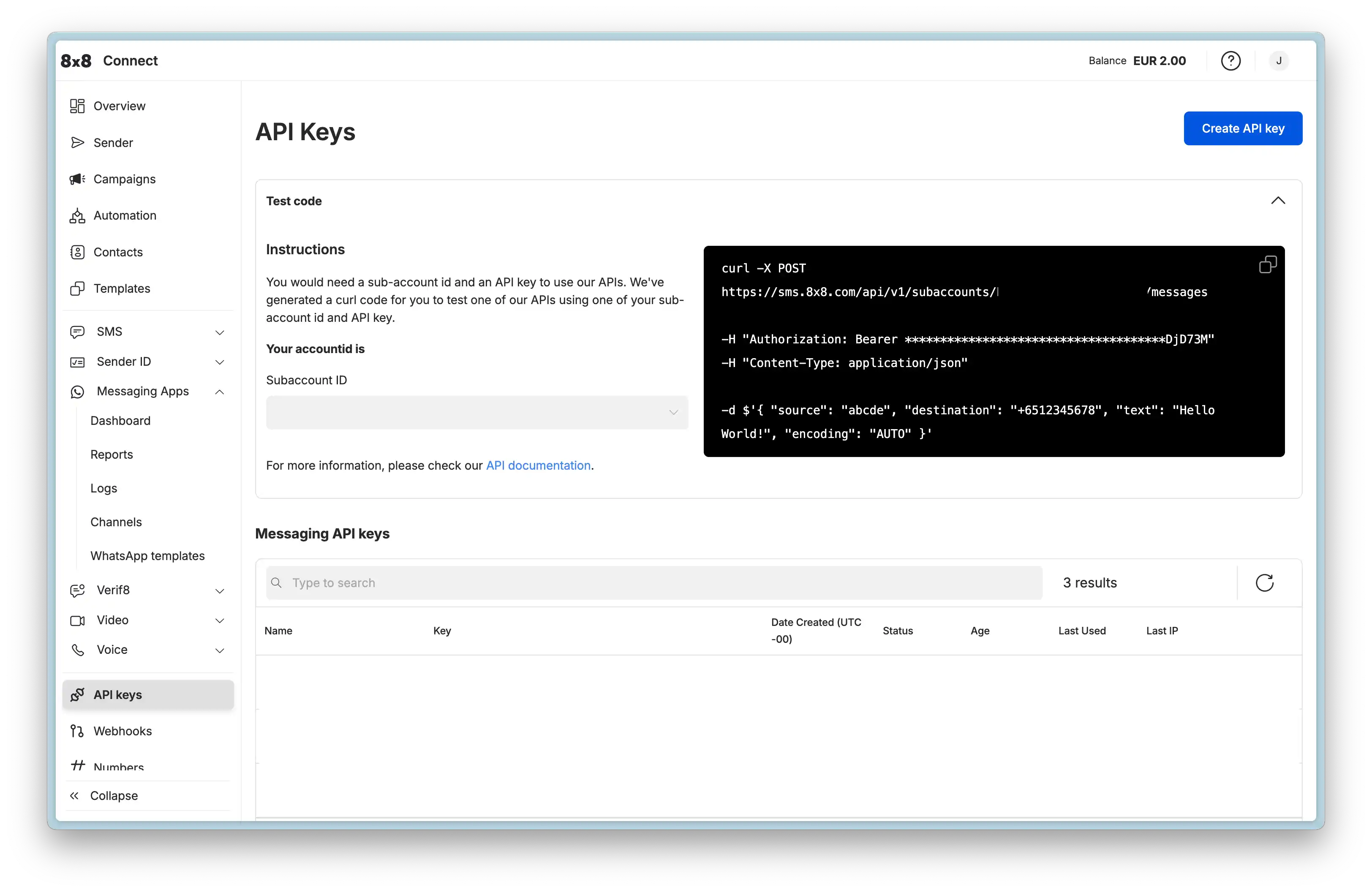
Generate API Keys:
You can generate and manage your API keys in the 8x8 Connect portal under API keys.
Security Best Practices:
- Store API keys securely in environment variables (never hardcode)
- Rotate keys regularly
- Use IP whitelisting for additional security (configure in portal)
Business-initiated Conversations: Templates
Templates are pre-approved message formats required to start a conversation with a customer. Using templates via the API is a two-step process:
- Create the template (registers with Meta for approval)
- Send the template (delivers to customers after approval)
These are two different API calls with different endpoints and requirements.
Why Templates Are Required
WhatsApp requires templates for business-initiated messages to:
- Prevent spam and maintain platform quality
- Ensure messages follow Meta's content policies
- Provide consistent user experience
- Support multiple languages with standardized formats
Key Concept: You cannot send freeform messages to initiate a conversation. You must start with an approved template. Once the customer replies, a 24-hour window opens for freeform messaging.
Creating a Template via API
Creating a template registers it with a specific WhatsApp Channel (phone number) and submits it to Meta for approval. Approval typically takes up to 24 hours.
Endpoint:
POST https://chatapps.8x8.com/api/v1/accounts/{accountId}/channels/{channelId}/templates
Path Parameters:
{accountId}: Your main 8x8 Account ID{channelId}: The specific WhatsApp Channel ID (phone number) for this template
Template Categories:
You must specify one of three categories:
- UTILITY: Account updates, order status, appointments (non-promotional)
- MARKETING: Promotional offers, new products, retargeting
- AUTHENTICATION: One-time passcodes (OTP) for verification only
Standard Example (Marketing Template with Image Header & Buttons):
This payload creates a MARKETING template with an image header, a variable in the body, a footer, and two buttons (one URL button with a variable and one Quick Reply).
View JSON
{
  "language": "en_US",
  "name": "marketing_image_template_demo",
  "category": "MARKETING",
  "components": [
    {
      "type": "HEADER",
      "format": "image",
      "examples": [
        "https://chatapps.8x8.com/files/991c9667f7644584acf91aa8dd9fba60.png?token=..."
      ]
    },
    {
      "type": "BODY",
      "text": "Hi {{1}}, ready to elevate your customer communications? Discover the power of 8x8 CPaaS.",
      "examples": [
        "Tony"
      ]
    },
    {
      "type": "FOOTER",
      "text": "Powered by 8x8"
    },
    {
      "type": "BUTTONS",
      "buttons": [
        {
          "type": "URL",
          "text": "Discover all channels",
          "url": "https://cpaas.8x8.com/en/products/{{1}}",
          "examples": [
            "omnichannel-messaging"
          ]
        },
        {
          "type": "quick_reply",
          "text": "Talk to Sales"
        }
      ]
    }
  ]
}
Key Fields:
language: Template language code (e.g.,en_US,es_MX)name: Unique identifier (lowercase, underscores only)category: Template category (affects approval and usage rules)components: Array of component objects (BODY required, HEADER/FOOTER/BUTTONS optional)
Component Constraints:
- Header media (IMAGE, VIDEO, DOCUMENT) can be uploaded via Upload Media API or self-hosted
- Each parameter (
{{1}},{{2}}) requires sample values inexamplesarray - Button text limited to 25 characters, URL limited to 2000 characters
For detailed component specifications (character limits, format requirements, button types), see:
- Template Components Reference - Complete technical specifications
For more template examples (authentication OTP, videos, carousels, locations, etc.), see:
- Template Message API Library - All template type examples
Sending a Template Message via API
Once a template is approved (status: APPROVED), you can send it to customers to initiate conversations.
Note: Addressing recipients by BSUID
Every send payload identifies the recipient in the
userobject. You can target the recipient bymsisdn(phone number), bychannelUserId(the WhatsApp Business-Scoped User ID, or BSUID), or both. At least one is required. If both are present,msisdntakes precedence. See Business-Scoped User IDs for how the two identifiers interact.
Endpoint:
POST https://chatapps.8x8.com/api/v1/subaccounts/{subAccountId}/messages
Path Parameters:
{subAccountId}: The Subaccount ID that owns the channel
Standard Example (Sending the Marketing Template Above):
This payload sends the marketing template we created above, providing actual values for the header image, body variable, and button URL parameter.
View JSON
{
  "user": {
    "msisdn": "+15551234567",
    "channelUserId": "US.13491208655302741918"
  },
  "type": "template",
  "content": {
    "template": {
      "language": "en_US",
      "name": "marketing_image_template_demo",
      "components": [
        {
          "type": "header",
          "parameters": [
            {
              "type": "image",
              "url": "https://chatapps.8x8.com/files/991c9667f7644584acf91aa8dd9fba60.png?token=..."
            }
          ]
        },
        {
          "type": "body",
          "parameters": [
            {
              "type": "text",
              "text": "Jason"
            }
          ]
        },
        {
          "type": "button",
          "index": "0",
          "subType": "url",
          "parameters": [
            {
              "type": "text",
              "text": "omnichannel-messaging"
            }
          ]
        }
      ]
    }
  }
}
Key Concepts:
- Parameter order must match template variables:
{{1}},{{2}},{{3}} - Use the exact
nameandlanguagefrom your approved template - Header media requires
urlparameter pointing to uploaded file - Button parameters use
indexto specify which button (0-based) - Footer component is not included in send payload (static text from template)
For complete send examples (all template types with exact payload structures), see:
- Template Message API Library - All template type examples
User-initiated Conversations: Interactive Messages
Once a customer replies to your template or messages you first, a 24-hour customer service window opens. During this window, you can send freeform, interactive messages without templates.
Why Interactive Messages Matter
Interactive messages enable:
- Rich, dynamic conversations without waiting for template approval
- Buttons and lists for user selection (better UX than free text)
- Media sharing (images, videos, documents, locations)
- Immediate responses within the 24-hour window
Key Concept: Interactive messages can ONLY be sent within the 24-hour window. To start a new conversation after the window expires, you must send a template.
Sending Interactive Messages via API
All interactive message types use the same endpoint as template messages, but with different type and content structures.
Endpoint:
POST https://chatapps.8x8.com/api/v1/subaccounts/{subAccountId}/messages
Message Types Available:
- Text: Simple text messages
- Media: Images, videos, audio, documents
- Location: Share coordinates and addresses
- Interactive Buttons: Up to 3 quick-reply buttons
- Interactive Lists: Up to 10 menu items in a scrollable list
- CTA Buttons: Call-to-action buttons (URL or phone)
- Product Messages: Catalog integration for e-commerce
For complete payload examples for all message types, see: Interactive Message API Library
Example: Interactive Buttons
Interactive buttons are the most common interactive message type. Send a message with up to 3 quick-reply buttons. When the user taps a button, you receive the button's title as a text reply via webhook.
View JSON
{
  "user": {
    "msisdn": "+15551234567",
    "channelUserId": "US.13491208655302741918"
  },
  "type": "interactive",
  "content": {
    "interactive": {
      "type": "button",
      "body": {
        "text": "Is your issue resolved?"
      },
      "action": {
        "buttons": [
          {
            "type": "reply",
            "reply": {
              "id": "yes-1",
              "title": "Yes"
            }
          },
          {
            "type": "reply",
            "reply": {
              "id": "no-1",
              "title": "No"
            }
          }
        ]
      }
    }
  }
}
When to Use: Yes/no questions, multiple choice selections, quick feedback
Webhook Response: When the user taps a button, your webhook receives:
View JSON
{
  "namespace": "ChatApps",
  "eventType": "inbound_message_received",
  "description": "ChatApps inbound message",
  "payload": {
    "umid": "<UNIQUE_MESSAGE_ID>",
    "subAccountId": "<SUBACCOUNT_ID>",
    "timestamp": "2025-12-02T06:58:50Z",
    "user": {
      "msisdn": "+15551234567",
      "channelUserId": "US.13491208655302741918",
      "name": "<USER_NAME>"
    },
    "recipient": {
      "channel": "whatsapp",
      "channelId": "<CHANNEL_ID>"
    },
    "type": "Interactive",
    "content": {
      "interactive": {
        "type": "button_reply",
        "button_reply": {
          "id": "yes-1",
          "title": "Yes"
        }
      }
    },
    "replyToUmid": "<ORIGINAL_MESSAGE_UMID>"
  }
}
Key Fields:
type:"Interactive"(not"Text")content.interactive.type:"button_reply"content.interactive.button_reply.id: The button ID you defined ("yes-1")content.interactive.button_reply.title: The button text displayed to user ("Yes")
For complete webhook documentation, see: Webhooks Reference - Inbound Messages
Receiving Messages & Delivery Status: Webhooks
To build two-way conversations and track message delivery, configure webhooks. Webhooks are HTTP POST requests that 8x8 sends to your server when events occur.
Key Webhook Types:
- Inbound Messages: Customer replies and messages
- Delivery Receipts: Message delivery, read, and failure status
- Template Status: Approval, rejection, quality changes
- Messaging Limits: Account tier upgrades and quality flags
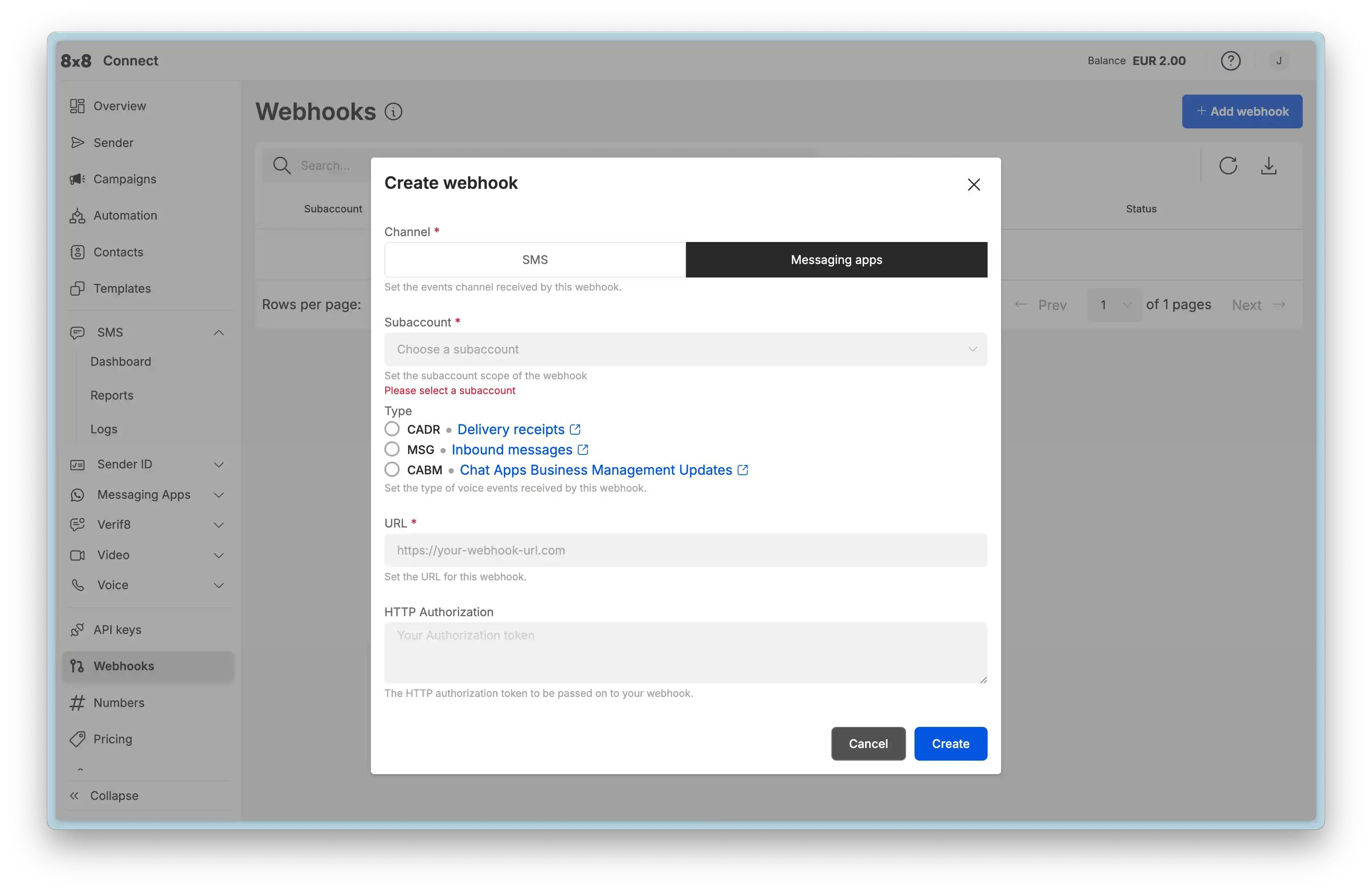
Configuration:
Set up webhook URLs in the 8x8 Connect portal under Webhooks.
Example: Receiving a Customer Reply
When a customer sends a text message, 8x8 posts to your webhook:
{
  "namespace": "ChatApps",
  "eventType": "inbound_message_received",
  "payload": {
    "umid": "9e09ac86-bd74-5465-851d-1eb5a5fdbb9a",
    "subAccountId": "SubAccount-1",
    "timestamp": "2016-01-01T14:34:56.017Z",
    "user": {
      "msisdn": "+15551234567",
      "channelUserId": "US.13491208655302741918"
    },
    "type": "Text",
    "content": {
      "text": "I need help with my order"
    }
  }
}
Your Response:
Your server should:
- Return HTTP 200 immediately
- Process the message asynchronously
- Send a reply using the Send Message API (if within 24-hour window)
For complete webhook documentation (all event types, payloads, security, and best practices), see:
- Webhooks Reference - Complete webhook guide
File & Media Management
WhatsApp supports rich media (images, videos, documents, audio). You can either:
- Host files on your own HTTPS server
- Upload files to 8x8's media hosting service
Using 8x8 Media Hosting
Upload Endpoint:
POST https://chatapps.8x8.com/api/v1/subaccounts/{subAccountId}/files
Upload Request (multipart/form-data):
curl -X POST "https://chatapps.8x8.com/api/v1/subaccounts/{subAccountId}/files" \
  -H "Authorization: Bearer YOUR_API_KEY" \
  -F "file=@/path/to/image.jpg"
Response:
{
  "status": "success",
  "data": {
    "url": "https://chatapps.8x8.com/files/abc123def456.jpg?token=xyz789"
  }
}
Using the URL in Messages:
Once uploaded, use the returned url in your message payloads:
{
  "user": {
    "msisdn": "+15551234567",
    "channelUserId": "US.13491208655302741918"
  },
  "type": "Image",
  "content": {
    "url": "https://chatapps.8x8.com/files/abc123def456.jpg?token=xyz789",
    "text": "Here is your order receipt"
  }
}
Supported Media Types:
- Images: JPEG, PNG (max 5MB)
- Videos: MP4, 3GPP (max 16MB)
- Audio: AAC, MP3, AMR, OGG (max 16MB)
- Documents: PDF, DOCX, XLSX, etc. (max 100MB)
Alternative: Self-hosted Media
You can provide your own HTTPS URLs instead of uploading to 8x8:
{
  "type": "Image",
  "content": {
    "url": "https://yourdomain.com/images/product.jpg"
  }
}
Requirements for self-hosted media:
- Must be publicly accessible via HTTPS
- Must not require authentication
- Must return appropriate
Content-Typeheaders
For detailed media management, see: Media Hosting & Management - Complete guide with best practices, security considerations, and troubleshooting
Next Steps
Now that you understand the core API concepts, explore these resources to build your integration:
API Reference Libraries:
- Template Components Reference - Detailed component specifications (character limits, formats, constraints)
- Template Message API Library - All template types with Create & Send payloads
- Interactive Message API Library - All interactive message types
- Webhooks Reference - Complete webhook event documentation
Implementation Guides:
- Advanced Capabilities - Build conversational journeys with Automation Builder
- Operations, Monitoring & Troubleshooting - Error handling and debugging
- Governance, Security & Compliance - Security best practices and compliance rules
Conceptual Foundation:
- Concepts & Fundamentals - Understand the 24-hour window, quality ratings, and limits
- Message Types & Templates - Deep dive into template rules and components