WhatsApp Webhooks Reference
Webhooks enable real-time, event-driven communication between the 8x8 platform and your application. When specific events occur (such as receiving a message, delivery confirmation, or template status change), 8x8 sends an HTTP POST request to your configured webhook URL with event details in JSON format.
Note:
channelUserIdis the BSUIDIn the latest webhook versions (inbound MO v3, delivery-receipt DR v9),
user.channelUserIdcarries the user's WhatsApp Business-Scoped User ID (BSUID), a stable per-business identifier in<country>.<digits>format. Earlier versions repeated the phone-number digits here instead, so the examples below show the BSUID form. See Business-Scoped User IDs for how BSUID works and which webhook versions and statuses surface it.
Configuration
You can configure your webhook URLs in the 8x8 Connect portal under Webhooks.
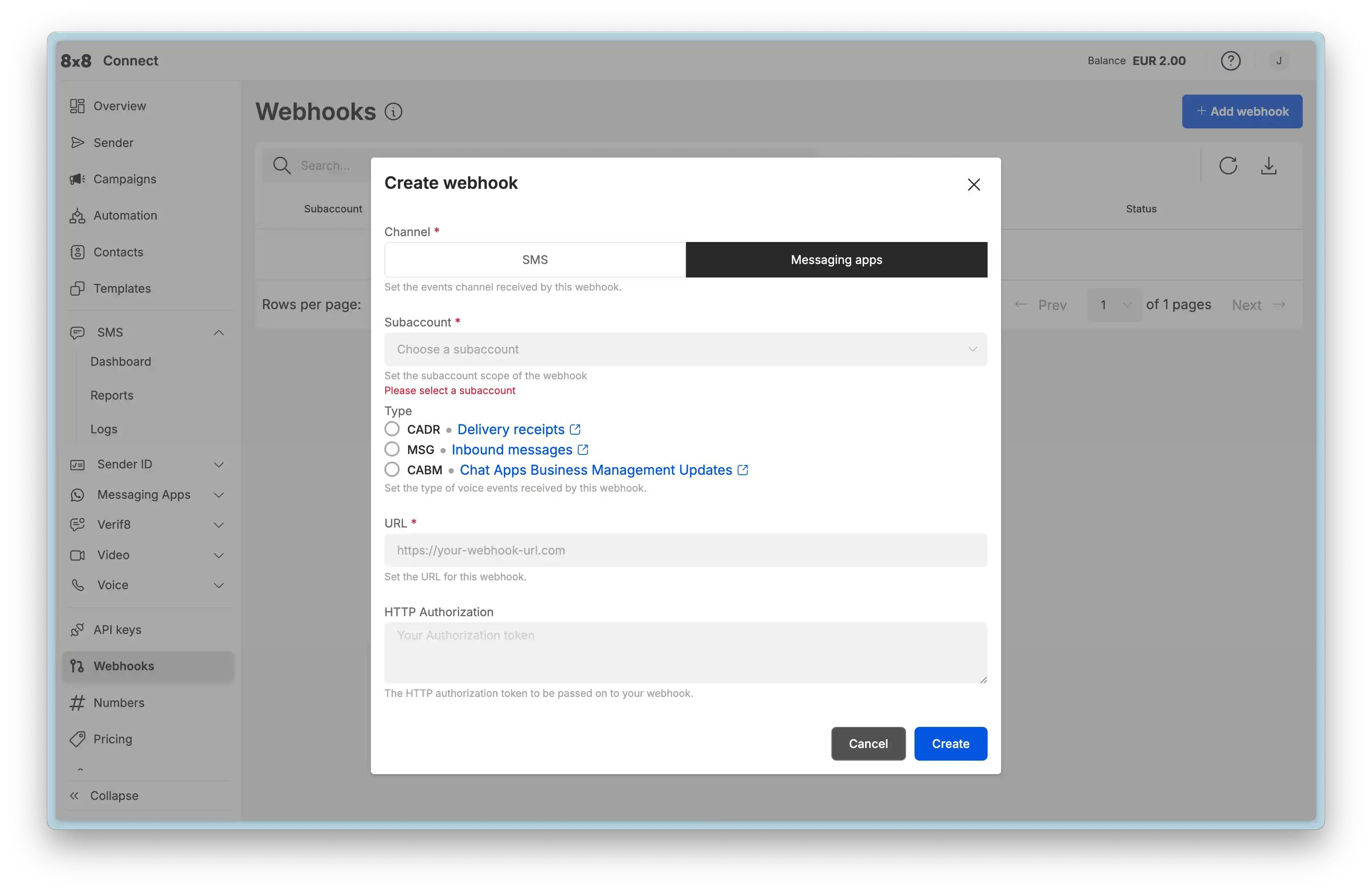
Key Requirements:
- Your webhook endpoint must be publicly accessible via HTTPS
- Your server should respond with HTTP 200 within 5 seconds
- Failed webhook deliveries will be retried with exponential backoff
Inbound Messages
Fires when a user sends a message to your WhatsApp number. This is the primary webhook for enabling two-way chat and building conversational applications.
- Event Type:
inbound_message_received
Use Cases:
- Respond to customer inquiries automatically
- Trigger workflows based on user input
- Route messages to appropriate agents or systems
- Process button/list selections from interactive messages
Inbound Message Types
The inbound message webhook structure varies based on the message type. Below are examples for the most common types.
Text Message
Sample JSON Payload:
{
  "namespace": "ChatApps",
  "eventType": "inbound_message_received",
  "description": "ChatApps inbound message",
  "payload": {
    "umid": "<UNIQUE_MESSAGE_ID>",
    "subAccountId": "<SUBACCOUNT_ID>",
    "timestamp": "2025-12-02T07:05:51Z",
    "user": {
      "msisdn": "+15551234567",
      "channelUserId": "US.13491208655302741918",
      "name": "<USER_NAME>"
    },
    "recipient": {
      "channel": "whatsapp",
      "channelId": "<CHANNEL_ID>"
    },
    "type": "Text",
    "content": {
      "text": "Hello"
    }
  }
}
Key Fields:
type:"Text"content.text: The text message content sent by the user
Media Message (Image, Video, Audio, Document)
Sample JSON Payload (Image):
{
  "namespace": "ChatApps",
  "eventType": "inbound_message_received",
  "description": "ChatApps inbound message",
  "payload": {
    "umid": "<UNIQUE_MESSAGE_ID>",
    "subAccountId": "<SUBACCOUNT_ID>",
    "timestamp": "2025-12-02T07:07:19Z",
    "user": {
      "msisdn": "+15551234567",
      "channelUserId": "US.13491208655302741918",
      "name": "<USER_NAME>"
    },
    "recipient": {
      "channel": "whatsapp",
      "channelId": "<CHANNEL_ID>"
    },
    "type": "Image",
    "content": {
      "url": "<MEDIA_FILE_URL>"
    }
  }
}
Key Fields:
type: Message type -"Image","Video","Audio","Document"content.url: Pre-signed URL to download the media file (expires after 24 hours)
Media Type Values:
Image: Customer sent a photoVideo: Customer sent a videoAudio: Customer sent a voice message or audio fileDocument: Customer sent a document (PDF, Word, Excel, etc.)
Interactive Message (Button Reply)
When a user responds to an interactive button or list, the payload includes the interactive response details.
Sample JSON Payload:
{
  "namespace": "ChatApps",
  "eventType": "inbound_message_received",
  "description": "ChatApps inbound message",
  "payload": {
    "umid": "<UNIQUE_MESSAGE_ID>",
    "subAccountId": "<SUBACCOUNT_ID>",
    "timestamp": "2025-12-02T06:58:50Z",
    "user": {
      "msisdn": "+15551234567",
      "channelUserId": "US.13491208655302741918",
      "name": "<USER_NAME>"
    },
    "recipient": {
      "channel": "whatsapp",
      "channelId": "<CHANNEL_ID>"
    },
    "type": "Interactive",
    "content": {
      "interactive": {
        "type": "button_reply",
        "button_reply": {
          "id": "option-2",
          "title": "FAQ"
        }
      }
    },
    "replyToUmid": "<ORIGINAL_MESSAGE_UMID>"
  }
}
Key Fields:
type:"Interactive"content.interactive.type:"button_reply"or"list_reply"content.interactive.button_reply.id: The button ID you definedcontent.interactive.button_reply.title: The button text the user sawreplyToUmid: The UMID of your original interactive message
Interactive Response Types:
button_reply: User tapped a quick-reply buttonlist_reply: User selected an item from an interactive list
Flow Submission (nfmReply)
When a user completes a WhatsApp Flow, the submission is delivered as a special type of interactive message.
Sample JSON Payload:
{
  "namespace": "ChatApps",
  "eventType": "inbound_message_received",
  "description": "ChatApps inbound message",
  "payload": {
    "umid": "abc123-def456-ghi789",
    "subAccountId": "your-subaccount-id",
    "timestamp": "2026-01-15T10:30:00.000Z",
    "user": {
      "msisdn": "+15551234567",
      "channelUserId": "US.13491208655302741918"
    },
    "recipient": {
      "channel": "whatsapp",
      "channelId": "your-channel-id"
    },
    "type": "Interactive",
    "content": {
      "interactive": {
        "type": "nfmReply",
        "nfmReply": {
          "responseJson": "{\"customer_name\":\"Jane Smith\",\"email\":\"jane@example.com\",\"feedback\":\"Excellent service!\",\"flow_token\":\"<FLOW_TOKEN>\"}"
        }
      }
    }
  }
}
Key Fields:
type:"Interactive"content.interactive.type:"nfmReply"(indicates a Flow submission)content.interactive.nfmReply.responseJson: JSON string containing the submitted form data
Parsing Flow Submissions:
The responseJson field contains a stringified JSON object. Always parse it before processing:
// Extract the response JSON string
const responseJsonString = payload.content.interactive.nfmReply.responseJson;

// Parse to object
const submissionData = JSON.parse(responseJsonString);

// Access submitted fields
console.log(submissionData.customer_name); // "Jane Smith"
console.log(submissionData.email); // "jane@example.com"
console.log(submissionData.feedback); // "Excellent service!"
Important:
- Always validate and sanitize submission data before processing
- Store
umidandflow_tokenfor traceability - Respond with a confirmation message within seconds
- Handle JSON parsing errors gracefully
See: WhatsApp Flows API - Webhook Integration for complete Flow submission handling guidance and examples.
Common Fields (All Message Types)
These fields appear in every inbound message webhook:
umid: Unique message identifier for this inbound messagesubAccountId: Your subaccount identifiertimestamp: ISO 8601 timestamp when message was receiveduser.msisdn: Customer's phone number (E.164 format)user.channelUserId: Customer's WhatsApp Business-Scoped User ID (BSUID)user.name: Customer's WhatsApp display name (if available)recipient.channel: Always"whatsapp"recipient.channelId: Your WhatsApp channel (phone number) IDtype: Message type determines content structurereplyToUmid: Present if customer replied to a specific message
Outbound Delivery Receipts
Fires when the status of an outbound message changes. Status updates include sent, delivered, read, and failure states. Read receipt checks continue for up to 10 days after message delivery.
- Event Type:
outbound_message_status_changed
Use Cases:
- Track message delivery success rates
- Retry failed messages
- Measure customer engagement (read receipts)
- Update CRM systems with delivery status
Possible Status States:
sent: Message successfully sent to WhatsAppdelivered: Message delivered to recipient's deviceread: Recipient opened and read the messageundelivered: Message failed to deliver
Sample JSON Payload (Delivered):
{
  "namespace": "ChatApps",
  "eventType": "outbound_message_status_changed",
  "description": "ChatApps outbound message delivery receipt",
  "payload": {
    "umid": "<UNIQUE_MESSAGE_ID>",
    "subAccountId": "<SUBACCOUNT_ID>",
    "channel": "whatsapp",
    "user": {
      "msisdn": "+15551234567",
      "channelUserId": "US.13491208655302741918"
    },
    "status": {
      "state": "delivered",
      "detail": "delivered_to_recipient",
      "timestamp": "2025-05-05T09:15:57.00Z"
    }
  }
}
Sample JSON Payload (Read):
{
  "namespace": "ChatApps",
  "eventType": "outbound_message_status_changed",
  "description": "ChatApps outbound message delivery receipt",
  "payload": {
    "umid": "<UNIQUE_MESSAGE_ID>",
    "subAccountId": "<SUBACCOUNT_ID>",
    "channel": "whatsApp",
    "user": {
      "msisdn": "+15551234567",
      "channelUserId": "US.13491208655302741918"
    },
    "status": {
      "state": "read",
      "timestamp": "2025-05-17T06:27:52.45Z"
    }
  }
}
Sample JSON Payload (Undelivered):
{
  "namespace": "ChatApps",
  "eventType": "outbound_message_status_changed",
  "description": "ChatApps outbound message delivery receipt",
  "payload": {
    "umid": "<UNIQUE_MESSAGE_ID>",
    "subAccountId": "<SUBACCOUNT_ID>",
    "channel": "whatsapp",
    "user": {
      "msisdn": "+15551234567",
      "channelUserId": "US.13491208655302741918"
    },
    "status": {
      "state": "undelivered",
      "detail": "rejected_by_operator",
      "timestamp": "2016-01-01T00:00:00Z",
      "errorCode": 15,
      "errorMessage": "Invalid destination"
    }
  }
}
Key Fields:
umid: Unique message identifier matching your original send requeststatus.state: Current delivery statestatus.detail: Additional context about the statuserrorCode&errorMessage: Present only for failed messages
Template Status Updates
Fires when your template's approval status changes. Meta reviews all templates before they can be used, and this webhook notifies you of approval, rejection, pausing, or disabling.
- Event Type:
template_status_update
Use Cases:
- Monitor template approval workflow
- Alert team when templates are rejected
- Track when templates are paused due to quality issues
- Automate template resubmission after fixing issues
Possible Status Values:
APPROVED: Template approved and ready to sendREJECTED: Template failed review (checkreasonfield)PENDING: Under Meta review (up to 24 hours)PAUSED: Temporarily disabled due to quality scoreDISABLED: Permanently disabled after multiple pauses
Sample JSON Payload (Status Update - Rejected):
{
  "eventId": "0f88f5c4-fae7-4dcf-8ff2-b2990133edea",
  "timestamp": "2025-01-01T00:00:00.00Z",
  "provider": "WhatsApp",
  "businessAccountId": "<BusinessAccountId>",
  "accountId": "<AccountId>",
  "eventType": "template_status_update",
  "eventDetails": {
    "templateId": "<TEMPLATE_ID>",
    "templateName": "<TEMPLATE_NAME>",
    "templateLanguage": "<TEMPLATE_LANGUAGE>",
    "meta": {
      "status": "REJECTED",
      "reason": "INCORRECT_CATEGORY"
    }
  }
}
Common Rejection Reasons:
INCORRECT_CATEGORY: Template submitted in wrong category (e.g., promotional content in UTILITY)INVALID_FORMAT: Parameter formatting issues or missing samplesABUSIVE_CONTENT: Violates Meta's content policiesSCAM: Appears to be fraudulent or misleading
Key Fields:
templateName&templateLanguage: Identifies which template changedmeta.status: New status valuemeta.reason: Rejection reason (present only when status isREJECTED)
Template Quality Updates
Fires when Meta updates the quality score for your template based on user feedback (blocks, reports). Quality scores affect whether templates get paused or disabled.
- Event Type:
template_quality_update
Use Cases:
- Monitor template performance in real-time
- Alert teams when quality degrades
- Pause campaigns using low-quality templates
- Correlate quality changes with campaign timing
Quality Score Values:
GREEN(High): Good user feedback, no issuesYELLOW(Medium): Some negative feedback, monitor closelyRED(Low): Poor feedback, template may be auto-pausedUNKNOWN: New template with insufficient data
Sample JSON Payload (Quality Update):
{
  "eventId": "0f88f5c4-fae7-4dcf-8ff2-b2990133edea",
  "timestamp": "2025-01-01T00:00:00.00Z",
  "provider": "WhatsApp",
  "businessAccountId": "<BusinessAccountId>",
  "accountId": "<AccountId>",
  "eventType": "template_quality_update",
  "eventDetails": {
    "templateId": "<TEMPLATE_ID>",
    "templateName": "<TEMPLATE_NAME>",
    "templateLanguage": "<TEMPLATE_LANGUAGE>",
    "meta": {
      "previousQualityScore": "UNKNOWN",
      "newQualityScore": "GREEN"
    }
  }
}
Key Fields:
meta.previousQualityScore: Previous quality ratingmeta.newQualityScore: Updated quality rating
Quality-Based Pausing:
- 1st RED score: Paused for 3 hours
- 2nd RED score: Paused for 6 hours
- 3rd RED score: Permanently disabled
Phone Number Quality & Messaging Limit Updates
Fires when your phone number's quality rating changes or when Meta adjusts your account's messaging tier limits based on sending patterns and quality.
- Event Type:
phone_number_quality_update
Use Cases:
- Monitor account health and reputation
- Track messaging limit increases as you scale
- Alert on limit downgrades due to quality issues
- Plan capacity based on current tier
Messaging Tier Limits:
TIER_250: 250 unique users per 24 hours (new accounts)TIER_1K: 1,000 unique users per 24 hoursTIER_10K: 10,000 unique users per 24 hoursTIER_100K: 100,000 unique users per 24 hoursUNLIMITED: No daily limit
Sample JSON Payload (Messaging Limit Upgrade):
{
  "eventId": "0f88f5c4-fae7-4dcf-8ff2-b2990133edea",
  "timestamp": "2025-01-01T00:00:00.00Z",
  "provider": "WhatsApp",
  "businessAccountId": "<BusinessAccountId>",
  "accountId": "<AccountId>",
  "eventType": "phone_number_quality_update",
  "eventDetails": {
    "displayPhoneNumber": "15550783881",
    "meta": {
      "event": "UPGRADE",
      "currentLimit": "TIER_10K",
      "oldLimit": "TIER_1K"
    }
  }
}
Sample JSON Payload (Quality Downgrade):
{
  "eventId": "0f88f5c4-fae7-4dcf-8ff2-b2990133edea",
  "timestamp": "2025-01-01T00:00:00.00Z",
  "provider": "WhatsApp",
  "businessAccountId": "<BusinessAccountId>",
  "accountId": "<AccountId>",
  "eventType": "phone_number_quality_update",
  "eventDetails": {
    "displayPhoneNumber": "15550783881",
    "meta": {
      "event": "FLAGGED",
      "reason": "QUALITY_DECREASE"
    }
  }
}
Key Fields:
displayPhoneNumber: Which phone number is affectedmeta.event: Type of change (UPGRADE,DOWNGRADE,FLAGGED)meta.currentLimit&meta.oldLimit: Tier change for limit updatesmeta.reason: Reason for quality flags
Event Types:
UPGRADE: Messaging limit increased (good sending history)DOWNGRADE: Messaging limit decreased (quality issues)FLAGGED: Phone number quality issue detected
Webhook Security Best Practices
Verify Webhook Origin
Always verify that webhook requests come from 8x8:
- IP Whitelisting: Configure your firewall to accept webhooks only from 8x8's IP ranges
- Signature Verification: Check the
X-8x8-Signatureheader (if provided) - HTTPS Only: Never accept webhooks over unencrypted HTTP
Handle Retries Gracefully
8x8 retries failed webhooks with exponential backoff:
- Make your webhook endpoint idempotent (safe to call multiple times)
- Use the
umidoreventIdto deduplicate events - Return HTTP 200 quickly, then process asynchronously
Error Handling
// Example webhook handler (Node.js/Express)
app.post('/webhooks/whatsapp', async (req, res) => {
  // Return 200 immediately
  res.status(200).send('OK');

  // Process asynchronously
  try {
    const event = req.body;
    await processWebhook(event);
  } catch (error) {
    console.error('Webhook processing failed:', error);
    // Log for manual review, don't fail the request
  }
});
Testing Webhooks
Local Development
Use tools like ngrok to expose your local server for webhook testing:
ngrok http 3000
# Use the generated HTTPS URL in webhook configuration
Webhook Logs
The 8x8 Connect portal provides webhook delivery logs:
- View recent webhook attempts
- See response codes and timing
- Retry failed deliveries manually
Related Resources
- WhatsApp over 8x8 API - Main API guide
- WhatsApp Business-Scoped User IDs (BSUID) - New DR v9 / MO v3 payload versions and the
user.channelUserIdfield - Operations, Monitoring & Troubleshooting - Error handling and debugging
- Governance, Security & Compliance - Security best practices